
만화 펭귄이 신나는 춤을 추는 모습은 정적인 그림으로는 결코 느낄 수 없는 강렬한 인상을 남깁니다. 춤추는 만화 동물들은 짧은 영상 콘텐츠에서 가장 안전한 선택지 중 하나로 자리 잡았습니다. 얼굴이 화면에 나오지 않고, 안무를 배울 필요도 없으며, 누구도 외면할 수 없는 매력적인 소재이기 때문입니다.
예전에는 애니메이션 기술이 관건이었는데, 그려진 캐릭터가 자연스럽게 움직이도록 하려면 프레임별로 작업해야 했기 때문입니다. 하지만 이제 그 문제는 해결되었습니다. AI 댄스 생성기 Mango AI를 사용하면 만화 동물 이미지 하나를 업로드하고 춤을 선택하면 완성된 영상을 얻을 수 있습니다.
이 가이드에서는 전체 과정을 자세히 설명하고, 애니메이션에 가장 적합한 이미지 유형과 크리에이터들이 이 형식을 어떻게 활용하는지 알아봅니다. 아직 어떤 도구를 사용할지 고민 중이라면, 최고의 도구들을 모아놓은 이 글을 참고하세요. 무료 AI 댄스 비디오 생성기 옵션은 유용한 출발점입니다.
Why Animal Dance Cartoon Clips Keep Going Viral
그 이유 중 하나는 단순한 대비 효과 때문입니다. 그림으로 그려진 캐릭터는 가만히 앉아 있어야 하므로, 캐릭터가 갑자기 춤을 추는 모습을 보면 작은 놀라움을 느끼게 되고, 바로 그 놀라움이 사람들이 스크롤을 멈추게 하는 요소입니다. 또한, 춤추는 동물 만화는 직접 촬영하는 어색함을 피할 수 있기 때문에, 사람 얼굴이 전혀 나오지 않는 많은 계정들이 이 형식을 활용하는 이유이기도 합니다. 게다가 동물 춤 만화는 애초에 촬영 자체가 없기 때문에 재촬영 비용도 들지 않습니다.
실용적인 이유도 있습니다. 만화 캐릭터는 초상권 침해 문제가 없기 때문에 브랜드나 익명의 채널에서 자유롭게 사용할 수 있습니다. 이러한 본능은 실사 버전의 트렌드에도 그대로 적용됩니다. 춤추는 고양이 영상 손 흔들기처럼 간단한 동작도 가능하지만, 만화 캐릭터를 사용하면 디자인을 완전히 자유롭게 제어할 수 있습니다. 만화 고양이의 춤은 색상 팔레트, 마스코트 또는 특정 농담에 맞춰 스타일링할 수 있는데, 실제 고양이는 절대 그렇게 협조하지 않죠.
What an AI Dance Generator Does with Cartoon Art
AI 댄스 생성기는 이미지 속 피사체를 분석하여 신체와 팔다리의 위치를 파악한 후, 미리 학습된 댄스 동작을 적용합니다. 캐릭터는 원래 모습을 그대로 유지합니다. 색상, 의상, 그림체는 그대로 유지되지만 포즈는 프레임마다 바뀌기 때문에 필터를 적용한 것이 아니라 애니메이션처럼 보입니다.
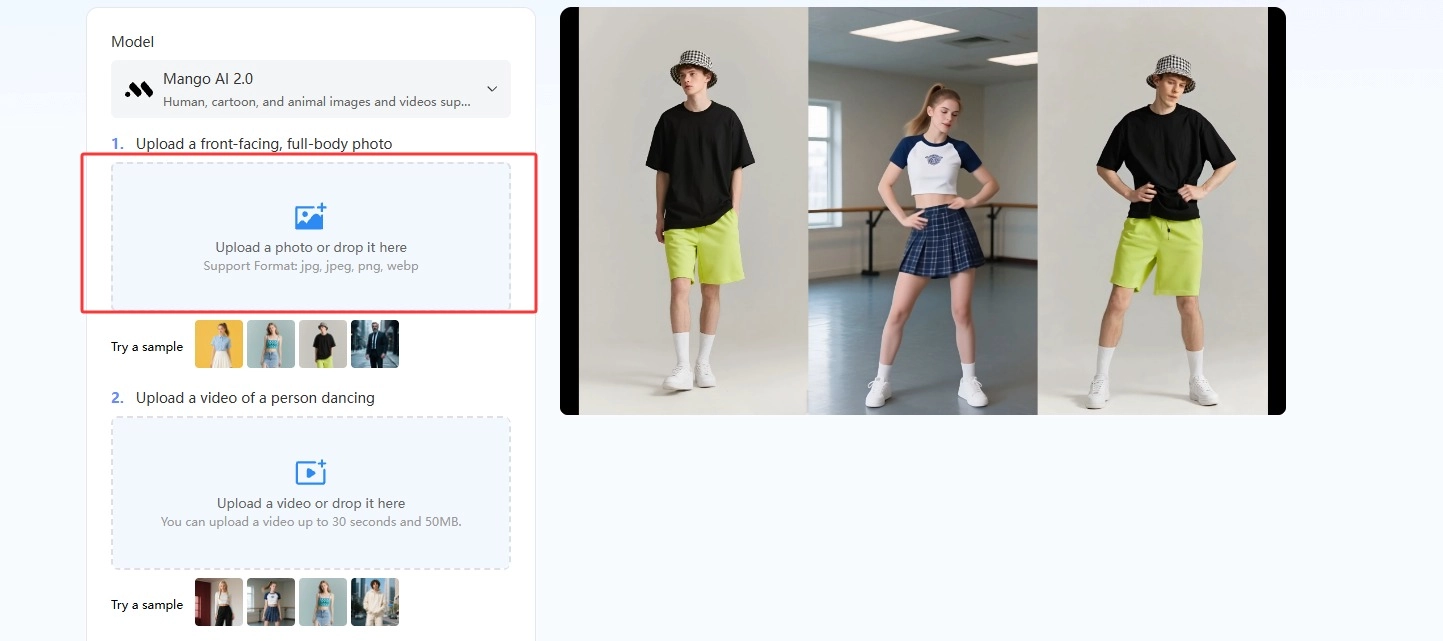
이 주제에서 중요한 세부 사항은 모델 지원입니다. 망고 AI Mango AI 2.0은 사람, 만화, 동물 이미지와 비디오를 지원하는 반면, Mango AI 1.0은 사람만 지원합니다. 춤추는 만화 동물을 애니메이션으로 만들려면 업로드하기 전에 2.0 모델을 선택하세요. 이 설정 하나만 제대로 하면 나머지 워크플로는 1분도 채 걸리지 않습니다.
How to Animate Dancing Cartoon Animals Step by Step
Mango AI의 AI 댄스 생성기 전체 과정을 세 단계로 나눕니다. 정지된 일러스트에서 다운로드 가능한 댄스 비디오가 만들어지기까지의 전체 과정을 보여드리겠습니다. 자, 춤추는 만화 강아지를 만들어 볼까요!
- 만화 동물 이미지를 업로드하세요
AI 댄스 생성기를 열고 애니메이션을 만들고 싶은 이미지를 업로드하세요. 캐릭터의 전신이 보이는 정면 사진을 사용하세요.
- 댄스 템플릿을 업로드하거나 선택하세요.
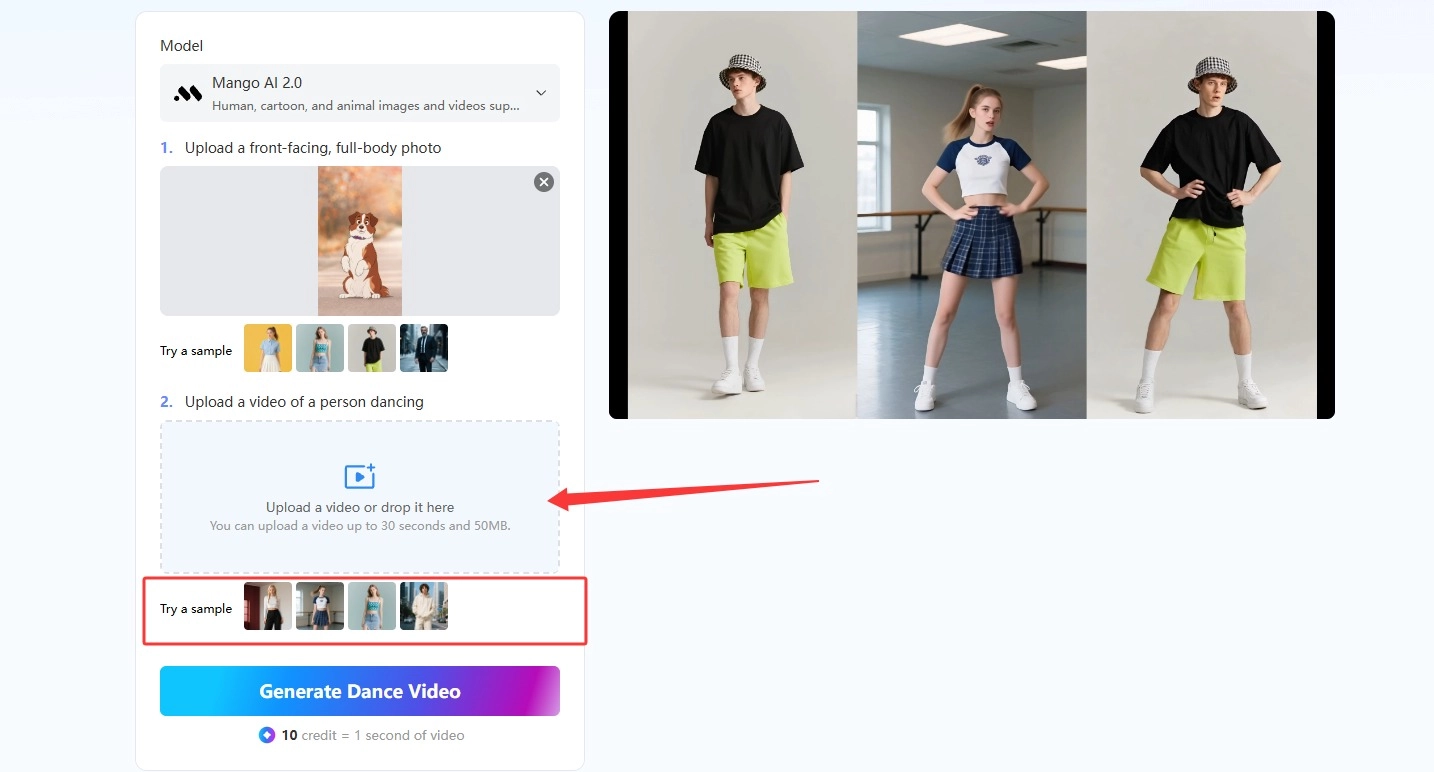
Mango AI의 미리 만들어진 댄스 라이브러리에서 안무를 선택하거나, 직접 촬영한 댄스 영상을 맞춤 템플릿으로 업로드할 수 있습니다. 인기 템플릿을 사용하면 즉시 움직임을 구현할 수 있고, 직접 촬영한 영상을 사용하면 동작을 세밀하게 제어할 수 있습니다.
- 나만의 댄스 영상을 제작하고 공유하세요
'생성' 버튼을 누르면 AI가 선택한 동작을 이미지에 적용하여 짧은 댄스 비디오를 만들어 줍니다. 영상을 다운로드하거나 소셜 미디어 계정에 바로 공유하세요.
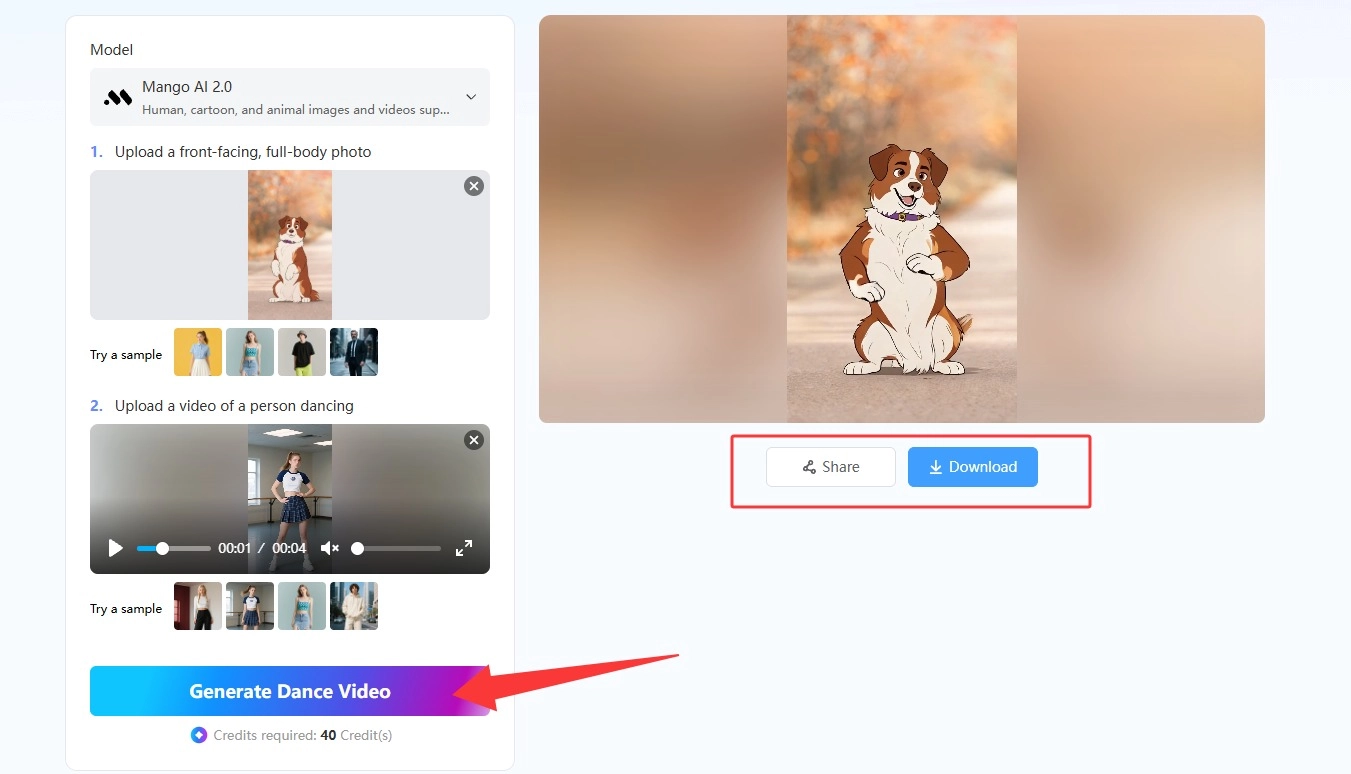
이것이 전체 작업 과정입니다. 출력 품질은 입력 이미지에 거의 전적으로 좌우되므로, 춤추는 만화 강아지가 깔끔하게 움직이도록 하려면 업로드하기 전에 다음 사항들을 확인하세요.
- Mango AI 2.0 모델로 전환하세요. 1.0 버전에서는 만화 및 동물 이미지가 지원되지 않습니다.
- 머리, 몸통, 팔, 다리가 모두 보이는 전신 정면 일러스트를 사용하십시오.
- 팔다리는 몸의 윤곽선에 붙이거나 겹치지 않도록 분리된 상태를 유지하세요.
- 테두리가 깔끔하고 배경과 색상이 명확하게 구분된 이미지를 선택하세요.
- 인물이 허리 부분에서 잘렸거나 보는 사람을 등지고 있는 이미지는 제외하세요.
- 캐릭터에 맞는 템플릿 에너지를 사용하세요. 곰처럼 느리게 움직이는 동물에게 빠른 동작을 적용하면 춤이라기보다는 코미디처럼 보일 수 있습니다.
- 첫 번째 렌더링 결과가 부자연스러워 보이면 동일한 이미지 쌍을 반복해서 시도하는 대신 이미지 또는 템플릿을 바꿔서 다시 생성하세요.
원본 그림이 없으신가요? 먼저 캐릭터를 만들어 보세요. AI 이미지 생성기그런 다음 댄스 도구로 가져오세요. 원하는 경우에도 동일한 업로드 규칙이 적용됩니다. 사진이 춤추게 하다 그림 캐릭터 대신 인물 초상화에서 발췌한 영상입니다.
Mango AI로 만든 춤추는 만화 동물 영상
Why Mango AI’s AI Dance Generator Suits Cartoon Animal Animation
사진에 애니메이션 효과를 주는 도구는 많지만, 대부분 사람의 신체를 기반으로 학습되어 있어 손으로 그린 여우나 스타일리시한 펭귄 같은 이미지를 입력하면 제대로 작동하지 않습니다. 특히 만화 동물이 춤을 추는 애니메이션을 만들 때 이러한 문제가 두드러집니다. Mango AI는 2.0 버전에서 만화 및 동물 이미지를 직접 입력받아 캐릭터를 다시 그리지 않고 움직임을 적용하므로, 그림 스타일이 그대로 유지됩니다.
- 만화, 동물, 사람 이미지 모두 동일한 도구에서 지원됩니다.
- 트렌드를 반영한 다양한 댄스 템플릿 라이브러리와, 특정 루틴을 원할 때 사용할 수 있는 맞춤 업로드 기능도 제공합니다.
- 원래 모습 그대로 유지: 얼굴 특징, 옷차림, 스타일은 그대로 유지되면서 움직임이 추가됩니다.
- 짧고 깔끔한 출력으로 TikTok, Instagram, Facebook 및 X에 최적화된 크기를 제공합니다.
- 다른 효과를 위한 보조 도구들, 예를 들어 말하는 동물 대화 클립의 경우 또는 펫 댄스 여러분의 반려동물의 실제 사진을 원하시면.
모든 기능은 브라우저에서 실행되므로 설치할 것도 없고 따로 학습해야 할 시간표도 없습니다. 중요한 컨트롤은 모델 선택기, 템플릿 선택기, 그리고 생성 버튼 세 가지입니다.
Picking Characters That Animate Well
모든 동물 일러스트가 움직임을 적용했을 때 똑같이 움직이는 것은 아닙니다. 두 발로 똑바로 서서 팔을 드러낸 캐릭터는 움직임 표현이 가장 자연스럽게 이어지는데, 이는 춤 동작의 기본 틀이 그러한 신체 형태를 기반으로 만들어졌기 때문입니다. 특히 춤추는 만화 강아지가 이러한 점에서 잘 어울립니다. 고양이 캐릭터는 보통 발을 손처럼 사용하여 서 있는 모습으로 그려지기 때문입니다. 만약 춤추는 만화 동물을 처음 그려보는 것이라면, 고양이 캐릭터의 기본 형태부터 시작하는 것이 좋습니다.
춤추는 펭귄 만화도 믿을 만한 선택입니다. 뚜렷한 실루엣, 몸에서 살짝 떨어져 있는 지느러미, 그리고 자연스러운 뒤뚱거리는 걸음걸이가 이미 춤 동작처럼 보이기 때문에 단순한 템플릿이라도 효과적입니다. 춤추는 곰 만화도 비슷한 장점을 가지고 있는데, 몸매가 날렵하기보다는 덩치가 커서 정교한 안무가 더 재미있게 보이기 때문입니다.
네 발로 서 있는 자세를 그릴 때 문제가 발생하기 쉽습니다. 네 발로 엎드린 채 춤추는 만화 강아지를 그리면 AI는 서 있는 자세에 맞는 신체 구조를 인식하지 못해 결과물이 어색해 보일 수 있습니다. 따라서 캐릭터를 서 있는 모습으로 그리거나, 반려동물 전용 도구를 사용하여 실제 사진을 사용하는 것이 좋습니다. 이 가이드에서는 이러한 장단점을 자세히 다룹니다. 개가 춤추는 영상.
Creative Ways to Use Your Dancing Cartoon Animals
1분 안에 짧은 영상을 제작할 수 있게 되면, 춤추는 만화 동물들은 일회성 개그 소재가 아니라 정기적으로 게시할 수 있는 콘텐츠가 됩니다. 업로드와 템플릿 선택만으로 모든 작업이 가능해지면, 유행이 시작되는 당일에 대응하는 것도 현실적으로 가능해집니다.
- 광고처럼 보이지 않도록 브랜드 마스코트를 트렌디한 일상 루틴에 활용해 보세요.
- 어린이 책이나 게임 캐릭터를 애니메이션으로 제작하여 출시를 홍보하세요.
- 매주 새로운 트렌드를 다루는 동물 댄스 만화 캐릭터가 등장하는 정기 시리즈를 제작하세요.
- 스티커 팩이나 아바타 디자인을 공유 가능한 밈 클립으로 만들어 보세요.
- 생일이나 명절 인사에 춤추는 펭귄 만화를 활용해 보세요. 겨울과 크리스마스 게시물에 아주 잘 어울립니다.
- 짧은 댄스 루프를 긴 영상의 전환 효과나 도입부로 활용하세요.
효과를 중첩할 수도 있습니다. 같은 캐릭터로 여러 효과를 동시에 적용해 보세요. 말하는 만화 말하는 버전의 경우, 춤도 추고 대사도 하는 마스코트가 있습니다. 캐릭터 디자인 자체에 관해서는 다음과 같습니다. 만화 제작자 이번 글에서는 사용해 볼 만한 도구들을 소개합니다.
Conclusion
예전에는 손으로 그린 캐릭터에 애니메이션을 입히려면 리깅, 키프레임, 그리고 많은 인내심이 필요했습니다. 하지만 이제는 업로드, 댄스 템플릿 선택, 다운로드만으로 가능합니다. Mango AI 2.0 모델은 만화 및 동물 이미지를 직접 입력받기 때문에, 춤추는 만화 동물 애니메이션을 만드는 것도 사람 사진을 이용한 댄스 애니메이션 제작만큼 쉽습니다. 먼저 선명한 전신 일러스트를 선택하고, 캐릭터에 맞는 안무를 고른 후 결과를 확인해 보세요. 만약 손으로 그린 캐릭터 대신 실제 동물을 애니메이션으로 만들고 싶다면, 다음 목록을 참고하세요. 펫 댄스 AI 다음으로 살펴볼 곳은 도구입니다.
Mango AI로 멋진 춤추는 만화 동물들을 만들어 보세요
Frequently Asked Questions
둘 다 가능합니다. Mango AI의 2.0 모델은 사람, 만화, 동물 이미지와 동영상을 지원하므로 춤추는 만화 동물도 사람 사진과 동일하게 작동합니다. 이전 버전인 1.0 모델은 사람만 처리하므로 그림 캐릭터를 업로드하기 전에 2.0으로 업데이트하세요.
윤곽선이 선명하고 배경과 잘 분리된 정면 전신 일러스트가 좋습니다. 팔과 다리를 추적하기 쉽기 때문에 두 발로 서 있는 자세가 애니메이션이 가장 부드럽게 작동합니다. AI가 작업할 구조가 부족하므로 잘린 이미지, 측면 프로필, 네 발로 기어가는 캐릭터는 피하는 것이 좋습니다.
아니요. Mango AI는 춤 동작을 추가하면서도 원래의 시각적 모습은 그대로 유지합니다. 따라서 얼굴 특징, 의상, 색상 및 그림 스타일은 일관성을 유지합니다. 프레임 간에 변경되는 것은 포즈뿐입니다. 이는 브랜드 마스코트나 특정 외형을 유지해야 하는 캐릭터를 애니메이션화할 때 중요한 요소입니다.
네. 춤추는 사람의 영상을 업로드하면 AI가 그 동작을 따라하여 캐릭터에 적용합니다. 이렇게 하면 기본 라이브러리에 없는 새로운 춤 동작을 만들 수 있습니다. 춤추는 사람이 화면 전체에 나오도록 영상을 업로드해야 동작이 캐릭터에 깔끔하게 반영됩니다.
짧은 동영상은 어디에서든 활용 가능합니다. 생성된 클립은 간결하고 시각적으로 선명하여 Facebook, Instagram, X, TikTok, YouTube Shorts 등 다양한 플랫폼에 적합합니다. 크리에이터들은 주로 밈, 마스코트 게시물, 그리고 촬영 없이 단 한 장의 이미지로 바로 제작할 수 있는 애니메이션 반응 영상 등에 활용합니다.