
Have you ever looked at a favorite photo and wished it would start moving to a beat? You can make photo dance clips from one still image now, with no camera, no choreography, and no editing timeline. Picture to dance AI reads the person in your shot and adds realistic dance motion in seconds.
This guide covers how to make a photo dance online with picture to dance from Mango AI, which photos give the smoothest results, and how creators are using these clips on TikTok and Reels. If you are still comparing options, this roundup of the best free AI dance video generator picks is a good place to start.
What Is Picture to Dance AI?
Picture to dance AI is an online tool that animates a static photo into a short dancing video. You upload a single-person image, the AI detects body structure, facial details, and posture, then applies motion frame by frame. The person in your photo keeps their original appearance while the dance moves are layered on top.
The appeal is how little work it takes. Tracking a figure and animating limbs by hand is slow even for experienced editors, but an AI dance generator handles all of it automatically. You can make an image dance with AI in about the time it takes to pick a song, which is why the format spread so fast.
A handful of tools now compete in this space, and they do not all work the same way.
- Viggle AI is the name most people run into first, built on motion transfer and a very large template library, which makes it a favorite for character and meme animation.
- Kling Motion Control sits at the other end: the movement looks more realistic, but you pay for it in render time and setup.
- Vidnoz Photo Dance runs in the browser and leans on syncing moves to music, though it wants a clear full-body shot to work with.
The tradeoff across most of them is the same. The tools that produce the best motion ask you to learn something first, and the tools that are easy tend to cap what you can change.
Mango AI Picture to Dance aims at the middle of that: pick a template, upload one photo, and get a clip that moves naturally without touching a single setting. The rest of this guide walks through that workflow.
Why People Make Photo Dance Videos
Most of these clips exist for fun, and that is the honest answer. You animate a selfie to make a group chat laugh, turn a friend’s old prom photo into a birthday joke, or put a childhood portrait on a routine it has no business doing. A still subject suddenly moving is funny in a way real footage is not, which is the same reason the dog dancing video trend keeps going.
Jumping on a trend is the other personal reason. A sound blows up on TikTok and you want something posted while it is still moving, but you do not want to learn the choreography or film yourself doing it. One photo and a template gets you in the conversation the same afternoon.
Then there is the marketing side, where the appeal is volume and speed. Social teams need a steady stream of posts, and animating a mascot, a product shot, or a campaign image gives them something moving without booking a shoot. Because you can make photo dance clips from assets you already own, testing five ideas costs about as much as testing one.
How to Make Photo Dance Videos with Mango AI (Step-by-Step)
Mango AI Picture to Dance runs the whole thing in three steps. Here is how to make photo dance videos from upload to download.
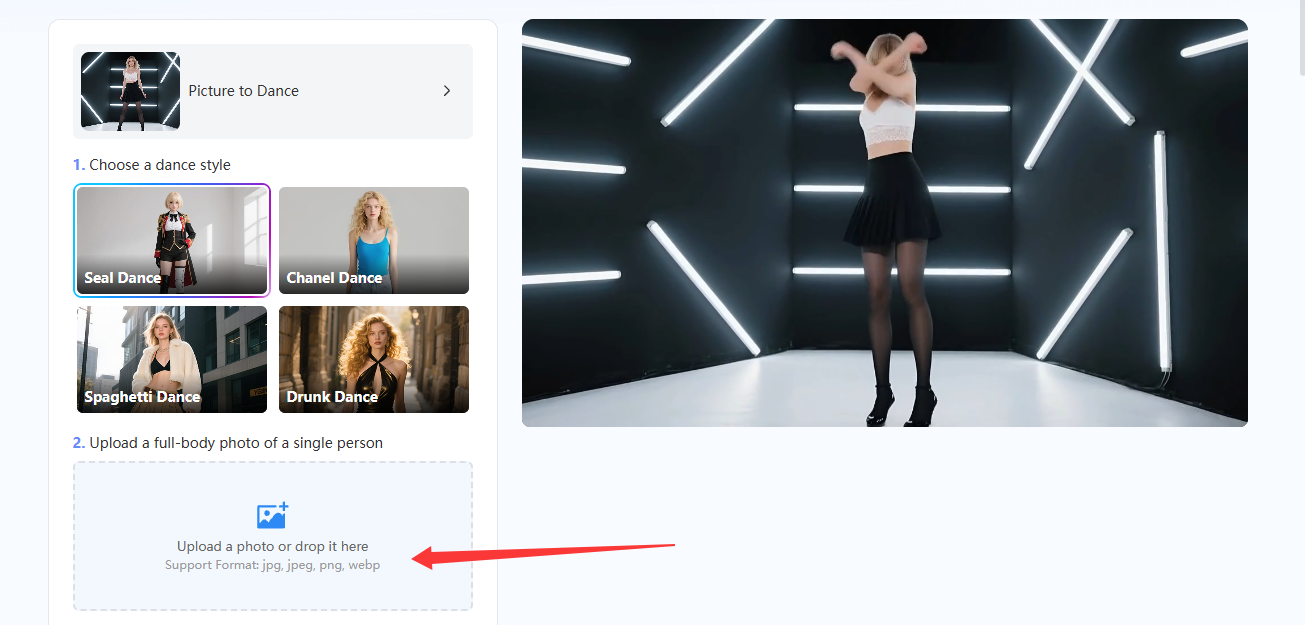
- Upload Your Image
Open https://mangoanimate.com/ai/picture-to-dance and upload the photo you want to animate. Use a clear image with the subject fully visible, ideally a full-body shot of one person.
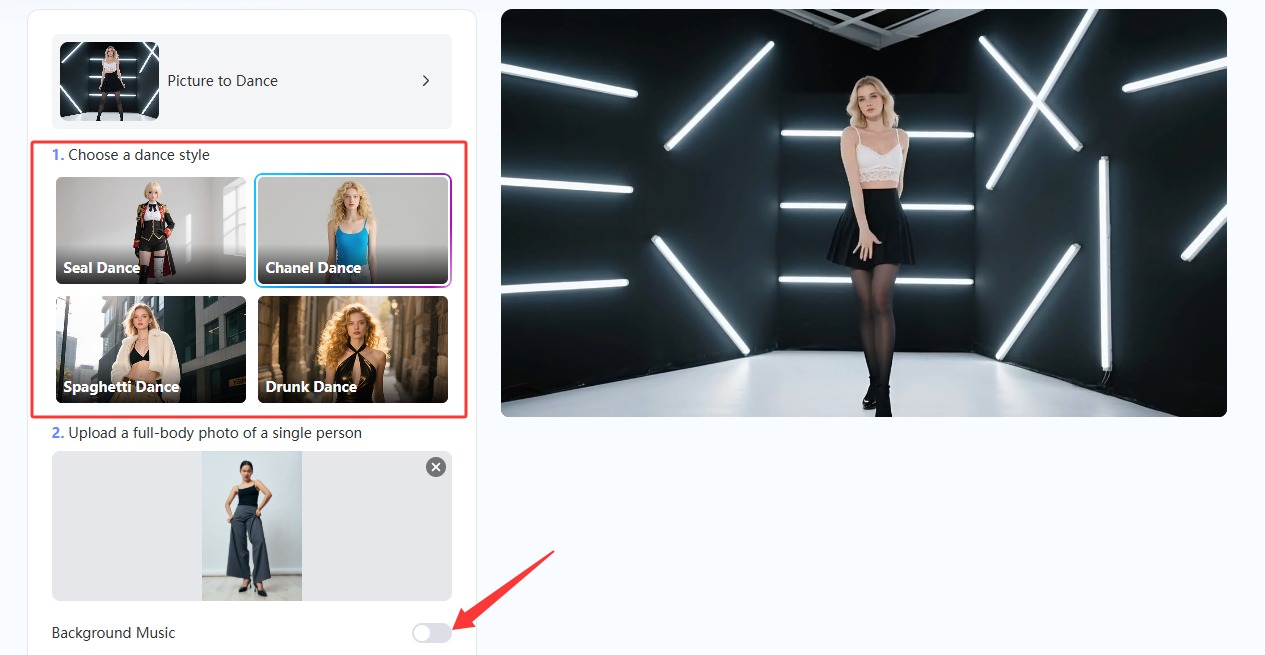
- Select a Dance Style
Pick one of the ready-made dance templates. Options range across TikTok challenges, viral memes, and classic routines, so choose the one that matches the energy of your photo.
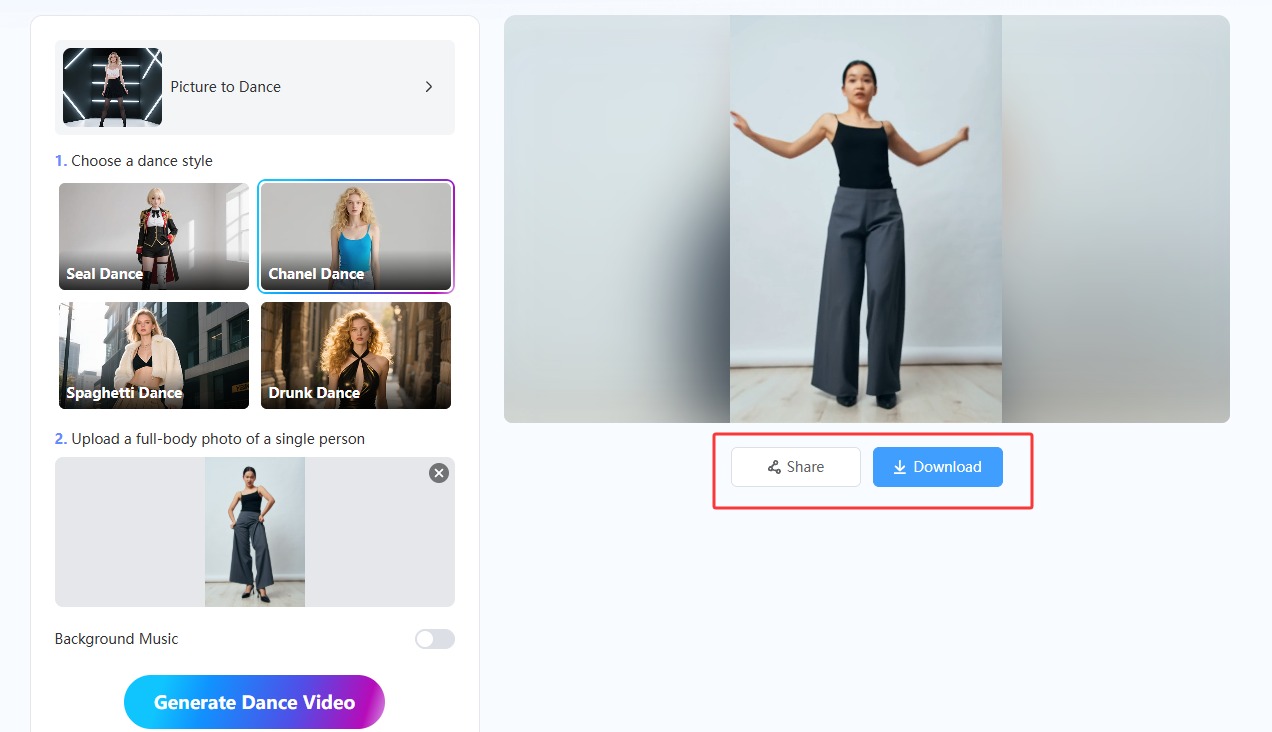
- Generate and Download
Click Generate Dance Video, and the AI builds a high-quality dance video in seconds. Download the finished clip and post it to social media or send it straight to friends.
That is the full workflow. The output quality depends almost entirely on what you feed it, so keep these points in mind before you upload if you want your make photo dance results to look natural:
- Use a front-facing, full-body photo so the AI can read posture and limbs clearly.
- Pick a well-lit shot and skip anything blurry or heavily shadowed.
- Keep hands and arms visible rather than tucked behind the body.
- Avoid crowded backgrounds that compete with the subject.
- Match the template to the mood of the photo, since a high-energy routine on a formal portrait reads as a joke rather than a dance.
- If the first render looks off, swap in a different photo or template and generate again.
The same upload rules apply to any image dance project, whether you are animating a portrait, an avatar, or a character illustration.
Photo Dance Video Made with Mango AI
What Makes Mango AI a Standout Picture to Dance AI
Lots of apps animate photos, but many produce stiff, sliding movement that gives the trick away immediately. Mango AI focuses on motion that flows from one step to the next, so a gentle sway and an energetic routine both read as real dancing rather than a puppet on strings.
- One-click viral dance templates pulled from current TikTok trends.
- Motion generation that tracks body structure, facial details, and posture.
- Output in seconds, not a render queue you wait out.
- Clips sized for TikTok, Instagram Reels, and Stories.
- Related tools if you want a different effect, like animate photos for subtle movement or image to video for a full moving scene.
Everything runs in the browser, so there is nothing to install and no learning curve to climb. Mango AI keeps the interface to the three controls you actually need: the upload box, the template picker, and the generate button.
Picking a Dance Style That Fits Your Photo
The template you choose changes the result more than most people expect. A routine with wide arm swings needs room in the frame, so a tightly cropped photo will look cramped no matter how good the animation is. Check how much space sits around your subject before you commit to a high-energy style.
Clothing matters too. Loose fabric and layered outfits read well in motion because the AI has visible edges to work with, while a plain silhouette against a similar-colored background gives it less to track. If your first attempt looks flat, that contrast issue is often the reason rather than the template itself.
Think about where the clip is going, as well. A meme posted to a group chat can be as chaotic as you like, but a brand post usually works better with a subtler routine. Creators who make photo dance content regularly tend to keep two or three reliable templates and rotate them instead of chasing every new trend.
Creative Ways to Use Your Photo Dance Videos
Once you can make photo dance videos on demand, the format stops being a one-off gag and turns into something you can post regularly. Being able to make an image dance with AI in a minute means you can react to a trend the day it breaks instead of a week later.
- Join a trending TikTok challenge without filming yourself.
- Animate an old family photo as a birthday or anniversary surprise.
- Turn a character illustration or avatar into a meme clip.
- Give a brand mascot or product shot some movement for social posts.
- Build short reaction videos that stop the scroll in a crowded feed.
Want to push the theme further? A face dance effect puts the motion in the expressions instead of the body, which suits close-up portraits better. Pet owners get their own version too, and this list of pet dance AI tools covers what is possible with animal photos.
Conclusion
Animating a still image used to mean hours in editing software and a decent grasp of keyframes. Picture to dance AI collapsed that into an upload, a template, and a download. With Mango AI you can make photo dance videos in under a minute and walk away with something ready to post. Pick a clear full-body shot, try a template that fits the mood, and see what your photo does. If you want more ideas first, browse this photo animation generator roundup before you start.
Create Awesome Photo Dance Videos with AI
Frequently Asked Questions
No. The AI detects body posture on its own and generates the motion for you, so there are no keyframes, timelines, or export settings to manage. You upload a photo, choose a dance template, and download the result. Anyone who can post to social media can handle the whole process.
Clear, well-lit photos where the subject faces the camera and is fully visible give the smoothest animation. Avoid blurry images, heavy shadows, busy backgrounds, and poses where the arms or hands disappear behind the body, since those make it harder for the AI to track movement accurately.
Not with this tool. Picture to Dance is built for single-person human photos and relies on tracking one clear, front-facing figure, so group shots and pet photos are not supported. Mango AI offers a separate pet dance tool for animal subjects if that is what you need.
Minutes. Once you hit generate, the AI produces a high-quality clip almost immediately and the download is ready right after. That speed is what makes it practical to test several photos or templates in one sitting instead of committing to a single render.
Yes to both. You can use AI-generated dance videos for social media, promotions, or commercial projects as long as you follow each platform’s terms. Your uploads stay private: Mango AI does not store or share them without permission, and they are not used for AI training.