
Tehnologia AI pentru transformarea imaginilor în animație este acum o realitate. Puteți găsi o mulțime de programe software online sofisticate, bazate pe inteligență artificială, care vă permit să convertiți cu ușurință fotografiile portret în animații uimitoare, gratuit, cu câteva clicuri sau atingeri. Cel mai bun lucru este că nu aveți nevoie de nicio experiență tehnică pentru a le utiliza. În acest articol, vă vom oferi un ghid simplu pentru a realiza procesul de animare a fotografiilor cu ajutorul inteligenței artificiale. Haideți să începem!
1. Find a Suitable AI Tool
Primul pas este să alegeți un Creator de portrete live cu inteligență artificială pe care le veți utiliza pentru a efectua conversia fotografie-animație. Puteți începe prin a căuta pe Google expresii cheie precum „animați o fotografie” sau „conversie fotografie-video prin inteligență artificială”.
Rezultatele motorului de căutare vă vor oferi zeci de liste diferite pentru potențiale programe software. Fiecare are diverse caracteristici, avantaje și dezavantaje, ceea ce poate face dificilă alegerea celui mai bun software pentru nevoile dumneavoastră.
Dacă ești începător, îți recomandăm să alegi Mango AI deoarece dispune de o interfață ușor de utilizat și algoritmi avansați de inteligență artificială pentru a genera mișcare realistă în fotografiile tale.
2. Prepare Your Source Video
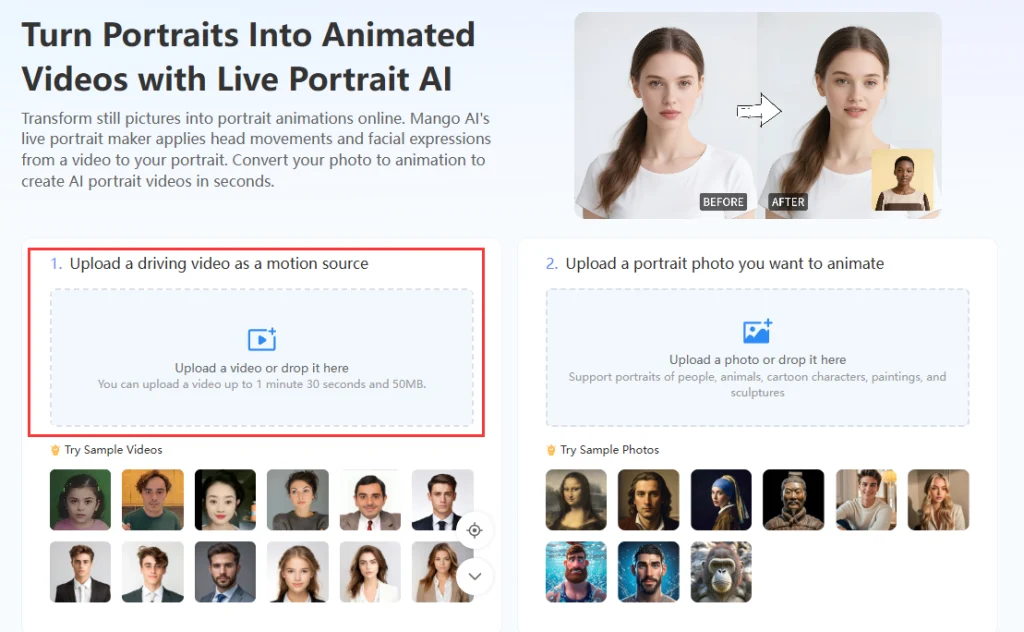
Videoclipul sursă este vital pentru a da viață fotografiei portret. Ar trebui să prezinte aceleași expresii faciale și mișcări ale capului pe care dorești să le afișezi în imagine.
Puteți fie să înregistrați singur videoclipul sursă, fie să utilizați videoclipurile de probă disponibile cu programul software. Dacă aveți expresii și mișcări specifice pe care doriți să le includeți în fotografia dvs., este mai bine să vă creați propriul videoclip sursă.
Pur și simplu instalați smartphone-ul sau camera digitală pe un trepied sau o masă pentru a asigura stabilitate videoclipului. Apoi, înregistrați-vă făcând expresiile faciale și mișcările pe care doriți să le realizați în fotografie. După înregistrarea videoclipului, salvați fișierul video în format MP4 pe dispozitivul mobil sau pe computer.
3. Select and Prepare Your Photograph
Următorul pas este să selectați o fotografie portret pe care doriți să o animați. Mango AI este compatibil cu portrete de oameni, picturi, sculpturi, animale și personaje de desene animate. Tehnologia sa foto animate poate da viață oricăruia dintre aceste portrete.
După ce ați ales o fotografie pe care să o animați, acordați-vă ceva timp pentru a o pregăti pentru conversie, modificându-i luminozitatea, claritatea, contrastul, culorile și alte caracteristici vizuale. Orice instrument de editare foto vă va permite să efectuați aceste modificări de bază pentru a îmbunătăți aspectul fotografiilor dvs.
Rețineți că cele mai bune rezultate ale inteligenței artificiale (AI) de la imagine la animație vor fi obținute doar dacă aveți o fotografie portret clară și vibrantă de convertit.
4. Upload the Files to the Software
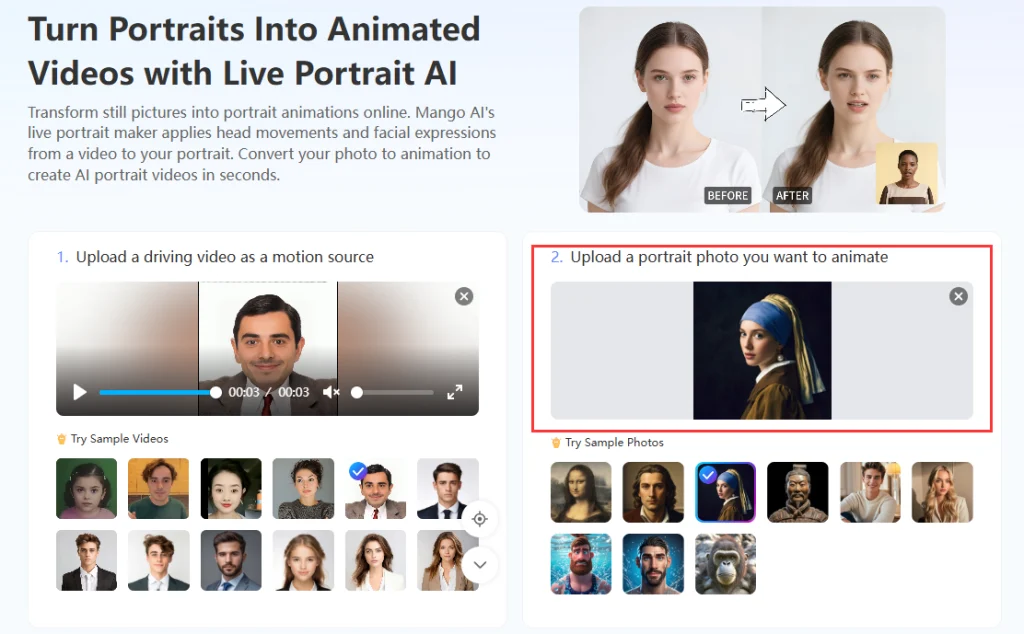
Când aveți videoclipul și fotografia sursă gata, puteți începe să le încărcați în software-ul dvs. de inteligență artificială pentru transformarea imaginilor în animație. Ar trebui să vedeți o secțiune pentru încărcarea videoclipului și o alta pentru încărcarea imaginii. Încărcați fiecare secțiune.
Alternativ, puteți utiliza videoclipurile și fotografiile eșantion pentru a testa software-ul, dacă sunt disponibile.
5. Create the AI Animated Photo
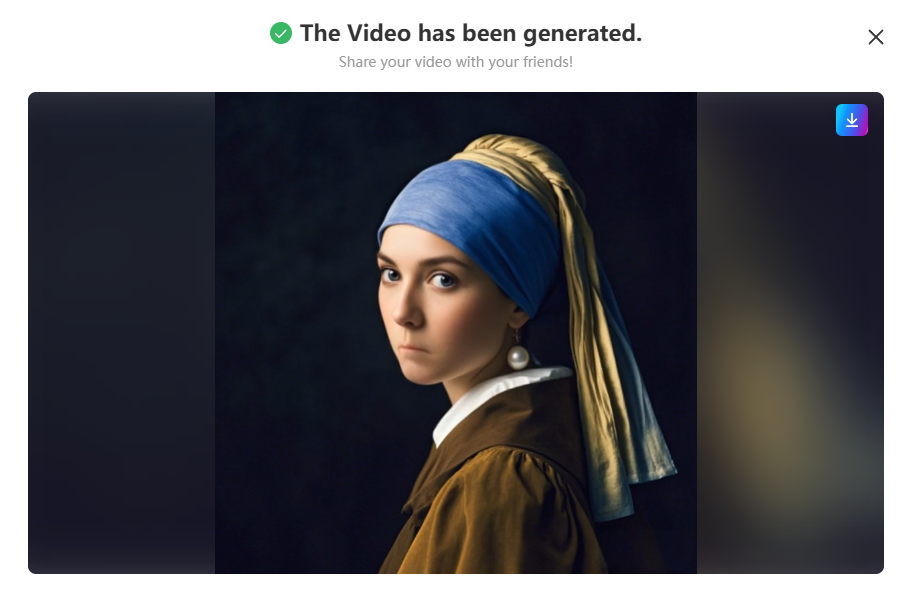
Apasă pe butonul „Creează portret live”, „Generează” sau pe un alt buton similar pentru a începe procesul de conversie a imaginii în animație. Procesul de conversie durează doar câteva secunde, așa că nu va trebui să aștepți mult pentru rezultate de înaltă calitate.
O previzualizare a videoclipului animat va apărea pe ecran. Unele programe software de inteligență artificială vă permit să aplicați efecte de animație predefinite suplimentare videoclipului. Dacă vedeți aceste opțiuni disponibile, încercați să experimentați cu altele diferite pentru a vedea cum arată videoclipul dvs.
6. Download the Final Video
Dacă sunteți mulțumit de videoclipul animat pe care l-ați creat, faceți clic pe butonul „Descărcare” pentru a-l salva pe dispozitivul mobil sau pe computer. Salvați-l ca fișier MP4 pentru a asigura compatibilitatea universală cu alte platforme și instrumente de editare.
Încarcă videoclipul într-o postare pe rețelele de socializare pentru a-l distribui prietenilor și familiei. De asemenea, poți încărca videoclipul pe site-ul tău web sau îl poți distribui într-o prezentare cu clienții în scopuri comerciale.
Additional Tips and Comments
Versiunile gratuite ale majorității programelor de animație foto bazate pe inteligență artificială vor avea anumite limitări privind aspecte precum dimensiunile fișierelor, durata videoclipurilor și numărul de utilizări. Dacă doriți să creșteți aceste limite sau să accesați funcții mai avansate, aveți opțiunea de a plăti pentru un abonament sau credite suplimentare. Funcțiile avansate pot include mai multe stiluri de animație și efecte prestabilite dacă nu sunteți mulțumit de sursa video.
Un alt lucru de reținut este că majoritatea platformelor software de animare foto cu inteligență artificială vor stoca temporar fotografiile și videoclipurile pe care le încărcați. Cu toate acestea, ar trebui să evitați încărcarea oricărui conținut media privat sau sensibil, de dragul intimității și confidențialității dumneavoastră. Încărcați doar conținut care nu vă deranjează să fie văzut de alte persoane.
Get Started Today
Tehnologia de transformare a imaginilor în animație prin inteligență artificială a făcut remarcabil de ușoară pentru oricine transformarea portretelor statice în videoclipuri vii și realiste. Cu doar câțiva pași simpli și instrumente ușor de utilizat precum Mango AI, puteți... animarea fotografiilor statice în câteva minute, fără nicio cunoaștere tehnică. Fie că este vorba de plăcere personală, partajare pe rețelele sociale sau în scopuri profesionale, această tehnologie oferă o modalitate simplă și creativă de a da viață fotografiilor tale. Începe să experimentezi astăzi și descoperă cât de uimitoare pot fi portretele tale animate.
Transformă imaginile statice în videoclipuri animate online cu ajutorul inteligenței artificiale