
Flying has always captured the human imagination — and now, AI makes it possible to put anyone in the sky with just a photo or a line of text. Whether you’re a content creator looking for a viral moment, a marketer wanting eye-catching visuals, or simply someone who wants to have fun with photos, Mango AI offers a suite of tools specifically built for this purpose.
In this guide, you’ll learn exactly what an AI flying effect is, which Mango AI tools support it, and how to create your own flying video step by step — no editing experience required.
What Is an AI Flying Effect?
An AI flying effect is a video animation technique that uses artificial intelligence to simulate the motion of flight. Rather than relying on physical green screens or expensive post-production software, AI models analyze a still image or a text description, then generate smooth, natural-looking movement that makes the subject appear to float, glide, or soar through the air.
The resulting clip can range from a gentle paragliding motion to a superhero-style vertical launch — depending on the tool and input you use. These effects are particularly popular for short-form social media content, personal creative projects, and branded video campaigns.
Easy-to-Use AI Flying Effect Tools
| Tool | Best For | Input Required |
| AI Flying | Quick flying effect from a photo | Single full-body photo |
| Image to Video | Custom flying scene from photo + prompt | Photo + text prompt |
| Text to Video | Fully imagined flying video from description | Text prompt only |
Let’s walk through each one in detail.
Tool 1: AI Flying — One-Click AI Flying Filter
What It Does
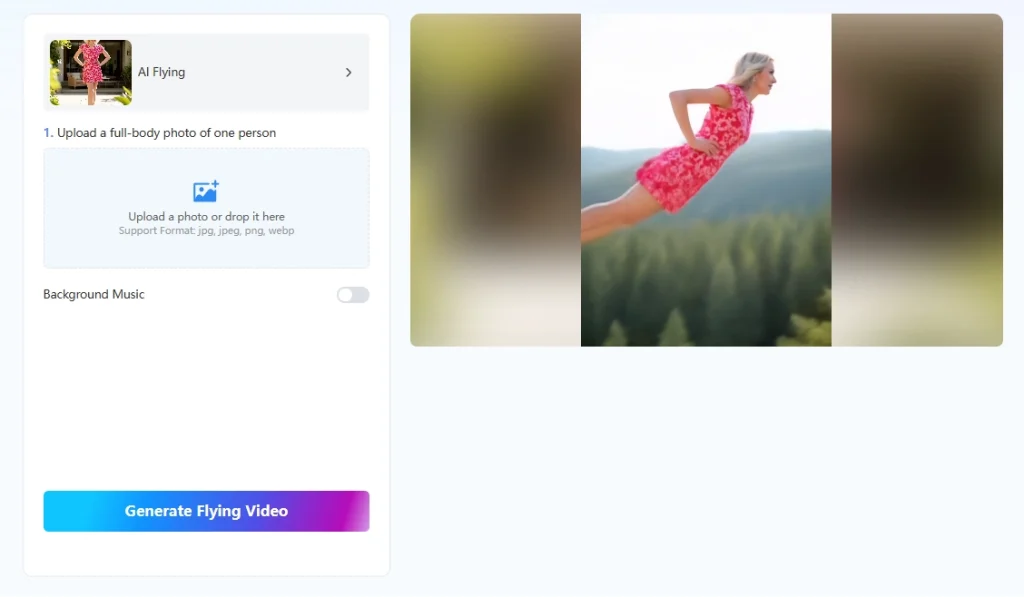
Mango AI Flying turns a full-body photo into a flying animation with a single click. It automatically detects the subject, removes the background, and creates a smooth flying effect—no prompts or additional settings required.
Best For
- Quick flying videos from photos
- TikTok, Instagram Reels, and YouTube Shorts
- Users who want the easiest workflow
How to Use
- Upload a clear full-body photo (JPG, JPEG, PNG, or WebP).
- Optionally add background music.
- Click Generate Flying Video.
- Download and share the finished video.
Pro Tip
Use a full-body image with open space above the subject for more natural flying motion.
Tool 2: Image to Video — Custom Flying Scenes
What It Does
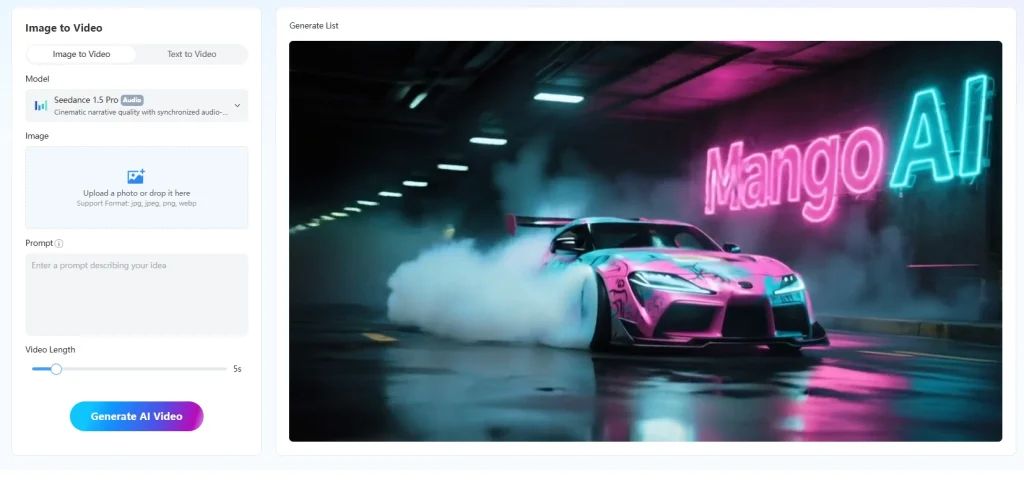
Image to Video lets you animate a photo using a text prompt, giving you control over the flying scene, camera movement, atmosphere, and style. Multiple AI models are available for different quality and speed preferences.
Best For
- Customized flying scenes
- Marketing and storytelling
- More control over the flying effect
How to Use
- Upload a clear image (JPG, JPEG, PNG, WebP).
- Write a prompt describing the flying scene.
- Adjust video length, resolution, motion range, AI model, and optional audio.
- Generate, review, and download the video.
Pro Tip
Combine detailed scene descriptions with camera directions, such as “camera follows from below” or “slow aerial pan,” to achieve more realistic flight animations.
Tool 3: Mango AI Text to Video — Flying Videos from Text
What It Does
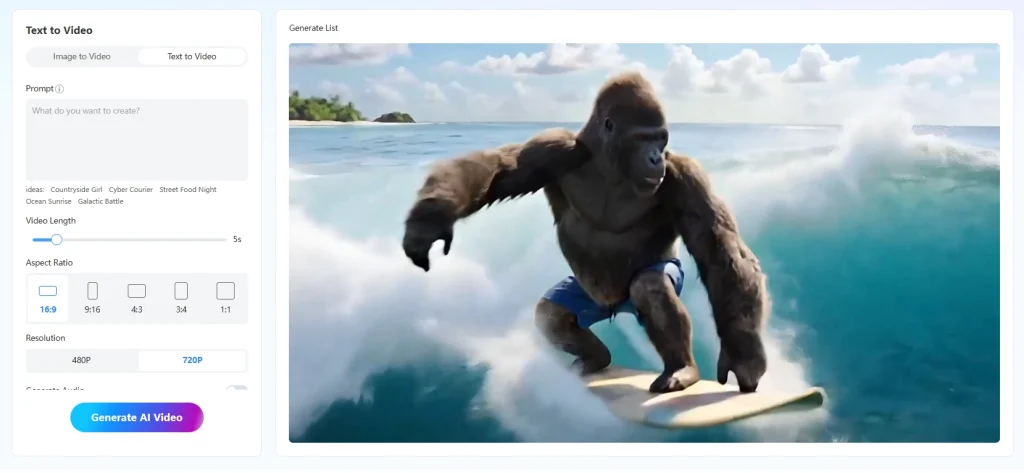
Text to Video creates a flying animation entirely from a text description. Simply describe the character, environment, camera movement, and mood, and the AI generates the scene from scratch.
Best For
- Fantasy or cinematic flying scenes
- Creative storytelling
- Videos that don’t require an existing photo
How to Use
- Open Text to Video.
- Enter a detailed flying prompt.
- Choose the aspect ratio, resolution, video length, AI model, and optional audio.
- Generate and download your video.
Pro Tip
Include both scene details and camera movement in your prompt for more cinematic results.
AI Flying Prompt Examples
- Cinematic landscape flyover: Drone flyover of a snow-capped mountain range at dawn, slow glide, mist filling the valleys, ultra-realistic, 4K
2. Superhero launch: Figure in a dark cape launches from a rooftop, camera follows from behind, city lights below, fast upward motion, cinematic
3. First-person cloud flythrough: POV flight through dramatic storm clouds at golden hour, turbulent air, lightning in the distance, IMAX quality
4. Fantasy float: Figure drifts peacefully above a glowing forest at night, slow movement, fireflies, soft wind, ethereal lighting
Choosing the Right Mango AI Tool for Your Flying Video
Here’s a practical guide to help you decide which tool to reach for:
- Use AI Flying when: You have a clear full-body photo of a person and want a flying animation with minimal setup. It’s the fastest path from photo to result.
- Use Image to Video when: You have a photo and want to define the specific flying environment, mood, and motion yourself. This tool gives you significantly more creative control and higher production quality.
- Use Text to Video when: You don’t have a starting photo, or you want to create a flying scene that’s entirely imagined — a fictional character, a fantastical setting, or a style that doesn’t exist in a real photograph.
Tips for Better AI Flying Videos
Regardless of which tool you use, a few principles consistently lead to better results:
- Use high-quality input. For photo-based tools, a high-resolution image with good lighting and a clearly visible subject gives the AI more to work with. Blurry or heavily cropped photos limit what the model can produce.
- Be descriptive in prompts. Vague prompts produce generic results. Specific prompts — including details about lighting, camera angle, speed, and atmosphere — help the AI understand exactly what you’re going for.
- Iterate freely. AI video generation is an iterative process. If your first result isn’t quite right, adjusting a few words in your prompt or changing the motion range can yield a noticeably different output. Don’t treat the first generation as final.
- Match tool to use case. The AI Flying tool is optimized for the specific flying effect; the other two tools are more general-purpose video generators that can handle flying as one of many possible scenes.
Final Thoughts
AI flying effects make it easier than ever to turn photos or text into engaging flying videos. Whether you’re using an AI flying filter for quick results or creating cinematic scenes from scratch, Mango AI offers a simple solution for every creative need. Choose the tool that fits your project, experiment with different prompts, and start creating eye-catching flying videos in minutes.
Create Engaging AI Flying Effects with Mango AI
Frequently Asked Questions
- What photo works best for the AI Flying tool?
A well-lit, full-body shot of one person against a relatively uncluttered background. The clearer the subject, the smoother the animation.
2. Can I use my own photo with Image to Video?
Yes. Upload any JPG, JPEG, PNG, or WebP image as the starting frame and guide the animation with a text prompt.
3. How long can the flying video be?
For Image to Video and Text to Video, the maximum video length depends on the AI model you choose. Different models support different video durations.
4. Can I use the videos commercially?
Yes, within the scope of Mango AI’s terms of service. The videos are suitable for social media, marketing, and branding use.