
Krátký klip s tancem domácího mazlíčka dokáže zastavit rolování rychleji než dlouhý popisek. Domácí mazlíčci už působí povědomě a hřejivě. Přidejte rytmus a pohyb a výsledek působí hravě, aniž byste potřebovali filmovou kulisu. Mnoho tvůrců nyní používá umělou inteligenci k vytvoření videa s tancem domácího mazlíčka z jedné jasné fotografie a krátkého referenčního klipu. Tato příručka vysvětluje, proč tato videa fungují, jak používat specializovaný online nástroj a jak udržovat výsledky připravené ke sdílení.
Why Pet Dance Content Performs Well
Sociální kanály odměňují pohyb, který působí lehkým a emotivním dojmem. Statická fotografie psa je roztomilá. Krátká smyčka, kde se pes pohybuje do rytmu, působí lépe zapamatovatelně. Diváci sdílejí klipy, které jsou snadno srozumitelné za méně než deset sekund. Tvůrci také oceňují nízké produkční zatížení. Nepotřebujete vycvičené zvíře, studio ani složitý střih. Jedna dobrá fotografie a krátká taneční reference mohou stačit pro první verzi. Tato rychlost pomáhá při testování nápadů pro TikTok, Reels nebo Shorts. Kvalita však závisí na volbě vstupních dat. Rozmazané obličeje a roztřesené reference často vedou k tuhému pohybu. Lepší zdrojové soubory obvykle znamenají čistší výsledky tance domácích mazlíčků.
Meet Mango AI’s Pet Dance Tool
Pokud chcete cílenější možnost, vyzkoušejte Mango AI Pet Dance. Je to online generátor klipů se zvířaty, která tančí. Stránka běží v prohlížeči, takže nepotřebujete žádný desktopový software.
Základní postup je přímý. Uživatelé mohou nahrát jasnou fotografii domácího mazlíčka, nejlépe celého těla, ve formátu JPG, JPEG, PNG nebo WebP, zachycujícího čelní stranu. Poté nahrají referenční taneční video o délce až 30 sekund a velikosti 50 MB. Poté klikněte na tlačítko „Generovat“ a počkejte na klip. Jasný obličej a tělo modelu dodají dostatek detailů pro věrohodné umístění pohybu.
Taneční styly jsou flexibilní, protože pohyby vycházejí z vašeho referenčního klipu. Street dance, jemné houpání, K-pop, hip hop nebo krátké domácí video, to vše může fungovat. Vy si vyberete náladu; nástroj sleduje pohyb v daném klipu.
Tento nástroj je součástí produktové sady Mango AI a využívá modelovou řadu Mango AI 2.0. Pracuje s obrázky zvířat, takže jako vstup lze použít psy, kočky a další domácí mazlíčky. Pro tvůrce domácích mazlíčků to znamená, že mohou z jedné statické fotografie vytvořit krátký, sdílený klip s tancem vašeho domácího mazlíčka. Pokud chcete video s tancem vašeho domácího mazlíčka s umělou inteligencí pro příspěvky na sociálních sítích, proces je od začátku do konce snadný.
Step by Step: How to Use the Tool
Postupujte podle těchto čtyř kroků na stránce Pet Dance na adrese https://mangoanimate.com/ai/pet-dance.
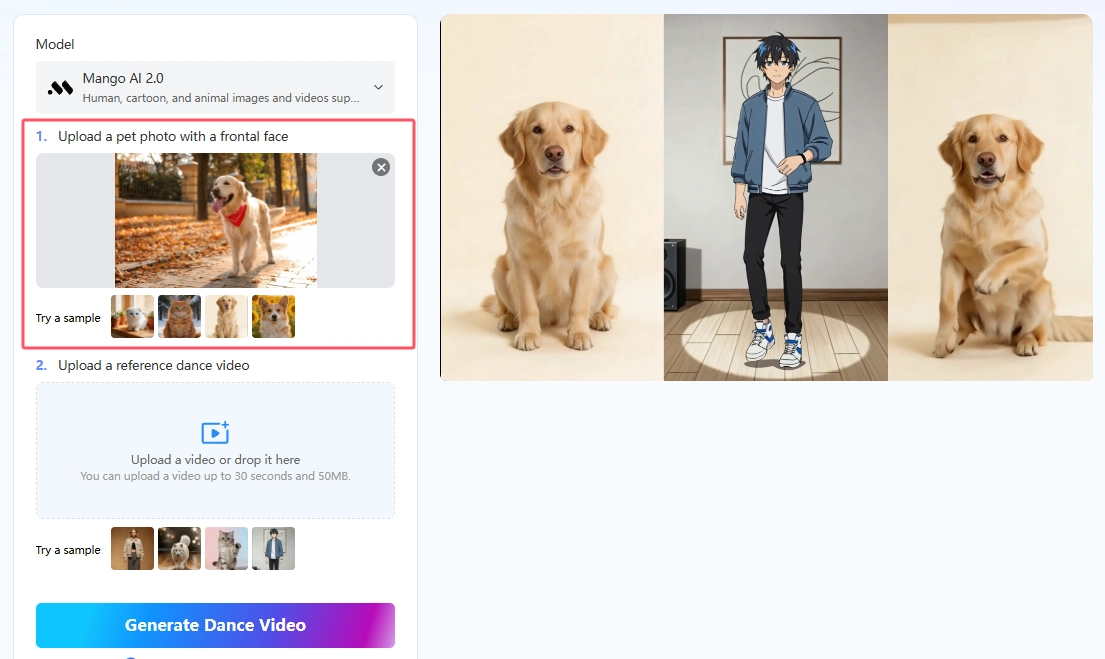
- Nahrajte fotku domácího mazlíčka
Vyberte si jasnou fotografii, která zachycuje obličej vašeho mazlíčka zepředu. Fotografie celého těla obvykle funguje lépe než detailní oříznutí. Měkké, rovnoměrné světlo pomáhá udržet obličej ostrý. Přetáhněte soubor do oblasti fotografie nebo jej vyberte procházením. Mezi podporované formáty patří JPG, JPEG, PNG a WebP. Pokud fotografie vypadá nejasně, nahraďte ji, než budete pokračovat. Pokud si chcete nejprve udělat rychlý test, jsou k dispozici ukázkové obrázky.
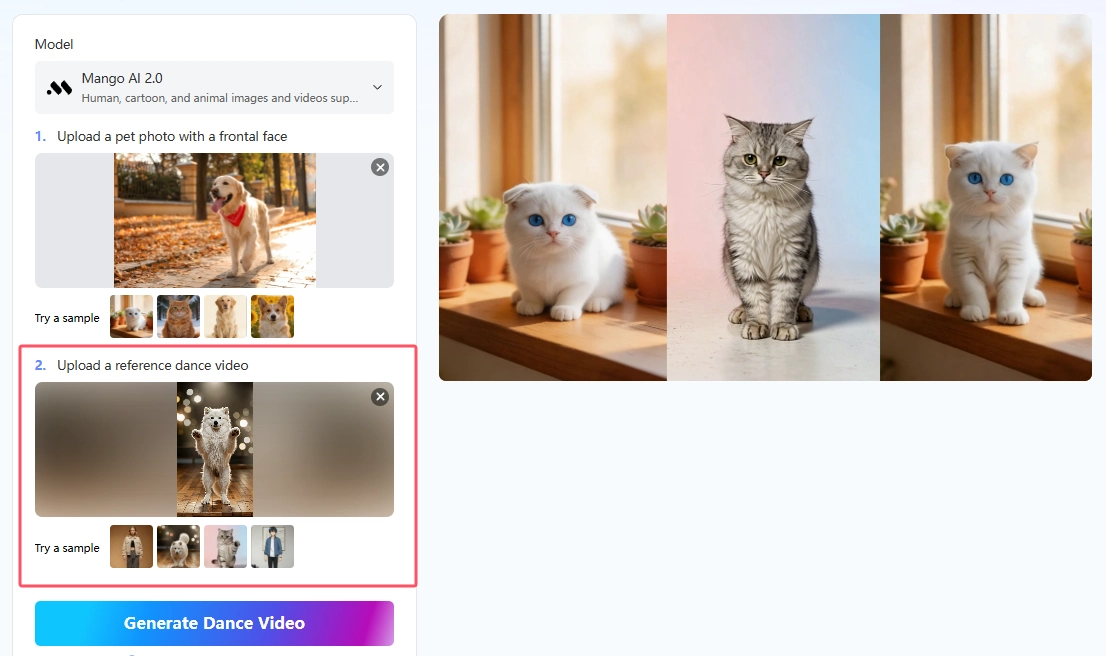
- Nahrajte referenční taneční video
Přidejte krátký klip, který jasně ukazuje taneční pohyb. Dodržujte délku a velikost souboru v rámci stanovených limitů: maximálně 30 sekund a 50 MB. Stabilní záběr s viditelnými končetinami se obvykle přenáší lépe než chaotický klip z ruky. Pokud potřebujete pouze první verzi, můžete také vyzkoušet ukázkovou referenci. Tento krok je nejpraktičtějším způsobem, jak vytvořit obsah s umělou inteligencí pro tanec domácích mazlíčků s možností stylistické kontroly.
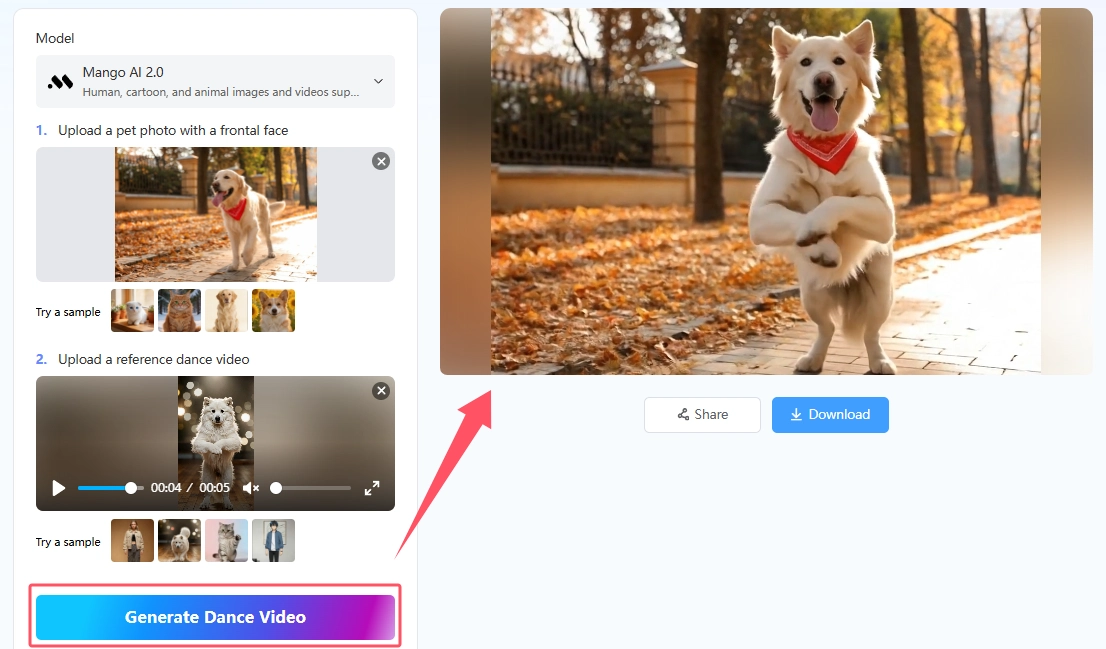
- Vytvořte taneční video
Klikněte na tlačítko Generovat taneční video a spusťte. Nástroj vygeneruje videa tančících domácích mazlíčků během několika minut. Jakmile je hotovo, váš klip bude připraven k dalšímu kroku.
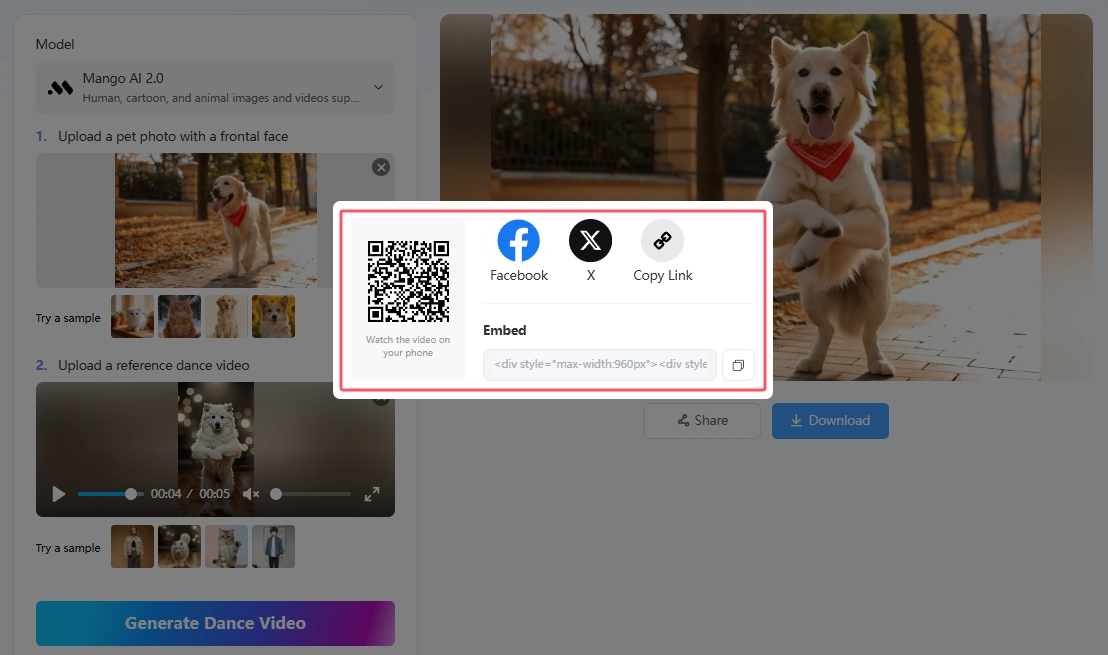
- Sdílet nebo stáhnout
Po vygenerování můžete klip odeslat nebo znovu použít pomocí panelu sdílení. Naskenujte QR kód a sledujte video v telefonu. Sdílejte jej přímo na Facebooku nebo X. Pomocí funkce Kopírovat odkaz načtěte URL adresu videa. Pomocí funkce Vložit zkopírujte HTML kód pro webové stránky nebo blog. Klip s vaším domácím mazlíčkem je poté připraven k použití.
What a Reliable AI Pet Dance Workflow Needs
Než začnete, definujte si cíl. Děláte vtip pro přátele, píšete příspěvek o značce nebo odpovídáte na trendy? Jasný záměr vám pomůže vybrat správný taneční styl a délku.
Praktický pracovní postup pro taneční scénu se mazlíčky má tři části. První je jasná fotografie mazlíčka s viditelnou přední částí. Druhou je referenční taneční video, které ukazuje čitelné pohyby těla. Třetí je krok generování, který přemění tyto vstupy do krátkého tanečního klipu.
Online nástroje jsou užitečné, když chcete rychlost a žádnou instalaci. Přístup k prohlížeči také usnadňuje testování. Můžete vyzkoušet jednu fotografii, prohlédnout si klip a poté vyměnit referenci, pokud se styl zdá být nevhodný.
Když lidé hledají způsoby, jak natočit videa s umělou inteligencí pro tanec domácích mazlíčků, často chtějí spíše kontrolu než magii. Nahrání reference tuto kontrolu poskytuje. Pouliční tanec, jemné pohupování nebo krátké domácí video mohou udat tón pro klip s umělou inteligencí tančícího domácího mazlíčka, který odpovídá vaší náladě.
Practical Tips for Better, Share-Worthy Results
Začněte s jasnou fotografií obličeje vašeho mazlíčka zepředu. Snímek celého těla obvykle funguje lépe než detailní ořez. Měkké, rovnoměrné světlo pomáhá udržet detaily ostré.
Vyberte si reference s jasnými tanečními pohyby. Velké, snadno viditelné kroky se přenášejí lépe než drobná gesta rukou. Kratší klipy vám také pomohou rychleji zkontrolovat výsledky.
Pokud chcete přirozený dojem, slaďte styl tance s vzhledem vašeho mazlíčka. Měkké kroky mohou vyhovovat klidné kočce, zatímco pohyby s těžkými poskakováními mohou vyhovovat hravému psovi. Stejně dobře může fungovat i kontrast. Klidný mazlíček v odvážné sestavě často působí vtipněji a lépe se o něj podělí.
A konečně, znovu použijte to, co funguje. Jakmile vám fotka poskytne čistý výsledek tance domácích mazlíčků, používejte ji dál. Změňte pouze referenci, když chcete nový styl. Tento zvyk vám ušetří čas a pomůže vám vybudovat si stabilní rytmus pro zveřejňování tance domácích mazlíčků.
Conclusion
Dobrý nápad na tanec se zvířaty nevyžaduje filmový štáb ani nacvičenou choreografii na živém zvířeti. S jasnou fotografií, čitelným referenčním klipem a cíleným online generátorem můžete vytvářet krátká videa, která působí vřele a sdílitelně. Začněte s lepšími vstupy, testujte jeden styl po druhém a před zveřejněním zkontrolujte každý výstup. Při opatrném používání se obsah s tancem se zvířaty může stát opakovatelným formátem pro přátele, tvůrce i značky.
Vytvořte úžasná videa s tancem domácích mazlíčků s Mango AI