
Twórcy treści, osoby prywatne i firmy dążą do tworzenia zachwycających filmów, które staną się viralami lub przyciągną dużą publiczność. Jednym z najlepszych sposobów na to jest tworzenie przyciągających wzrok animacji Ziemi z zoomem. Przed rewolucją sztucznej inteligencji, tworzenie takich filmów wymagało zaawansowanych umiejętności animacyjnych. Teraz, dzięki sztucznej inteligencji, każdy może powiększyć Ziemię w filmie bez konieczności posiadania specjalistycznej animacji ani umiejętności technicznych.
What It Means to “Zoom In on the Earth” in Video Animation
Nowoczesne narzędzia AI online potrafią nakładać efekty przybliżania Ziemi na statyczne zdjęcia. Efekty te tworzą specjalną animację, w której kamera przybliża obraz z orbity okołoziemskiej, przechodząc przez atmosferę, aż dotrze do fotografowanej osoby, miejsca lub zwierzęcia na ziemi. To realistyczna animacja wideo, którą AI może wygenerować w ciągu kilku sekund.
Dzięki temu nie musisz spędzać wielu godzin na ręcznym animowaniu filmów, aby uzyskać efekt powiększenia Ziemi. Wystarczy odpowiednie narzędzie do powiększenia Ziemi oparte na sztucznej inteligencji, które wykona całą pracę za Ciebie szybko i profesjonalnie.
Zoom In on the Earth Easily with Mango AI
Mango AI jest najbardziej polecane powiększenie Ziemi w generatorze wideo AI do stosowania efektów Ziemi z zoomem do zdjęć i generowania animowanych filmów. Oferuje przyjazny dla użytkownika interfejs, który pozwala przekształcić dowolne zdjęcie w ekscytujący film z zoomem. Sztuczna inteligencja wykona za Ciebie całą pracę, skanując obiekt na zdjęciu i stosując efekt Ziemi z zoomem. W ciągu kilku sekund efektowny film z animacją Ziemi z zoomem będzie gotowy do pobrania i udostępnienia online.
Step-by-Step Guide to Zoom In on the Earth with Mango AI
Chcesz wiedzieć, jak łatwo powiększyć Ziemię za pomocą Mango AI? Oto trzy podstawowe kroki, dzięki którym możesz dodać efekt powiększenia Ziemi do swojego zdjęcia za pomocą Mango AI.
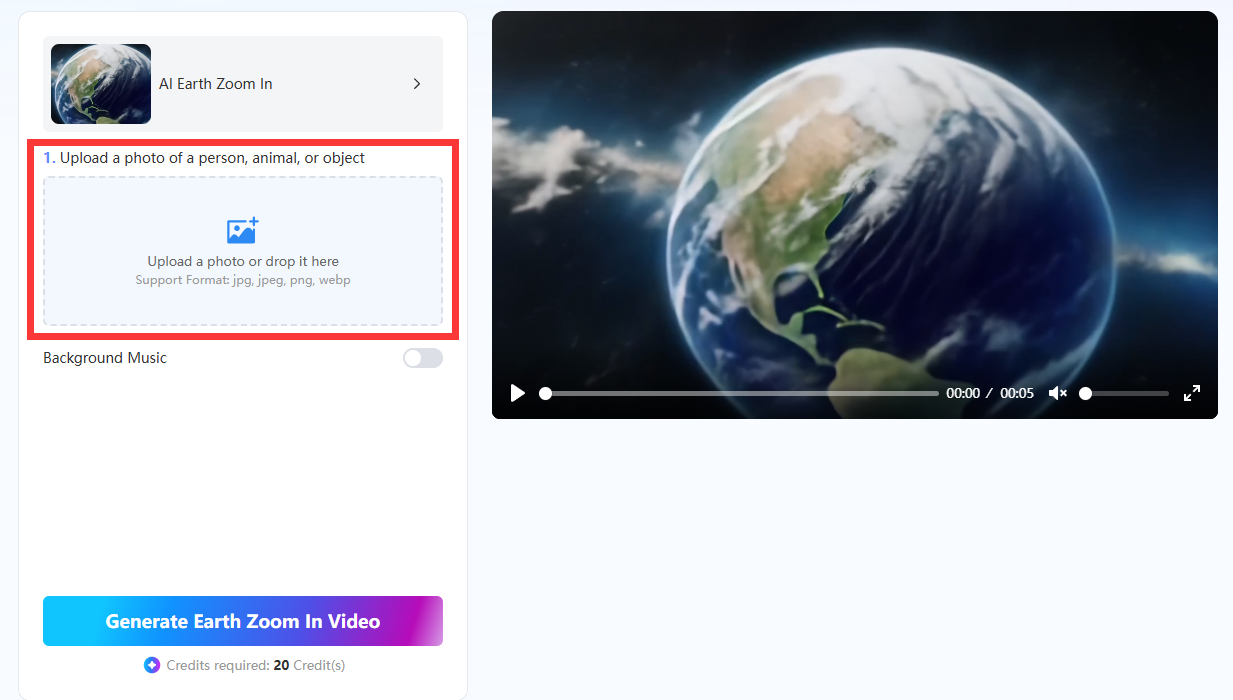
- Prześlij zdjęcie
W interfejsie Mango AI pierwszą rzeczą, którą należy zrobić, jest przesłanie zdjęcia osoby, przedmiotu lub zwierzęcia. Obsługiwane formaty plików graficznych to JPG, JPEG, PNG i WEBP. Możesz kliknąć przycisk przesyłania lub przeciągnąć plik graficzny z komputera do wyznaczonego miejsca.
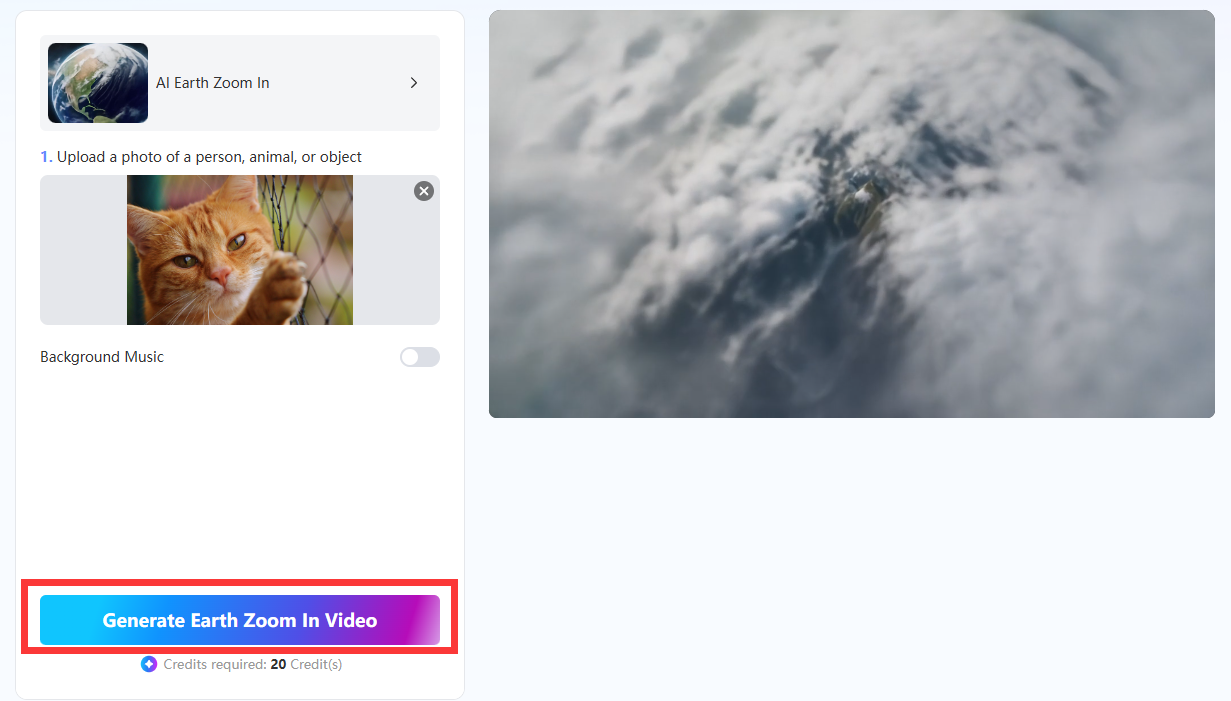
- Kliknij przycisk Generuj
Po zakończeniu przesyłania zdjęcia kliknij przycisk „Generuj wideo z powiększeniem Ziemi” u dołu. Sztuczna inteligencja rozpocznie skanowanie szczegółów zdjęcia i zastosuje efekt powiększenia Ziemi. Zakończenie powinno zająć tylko kilka sekund.
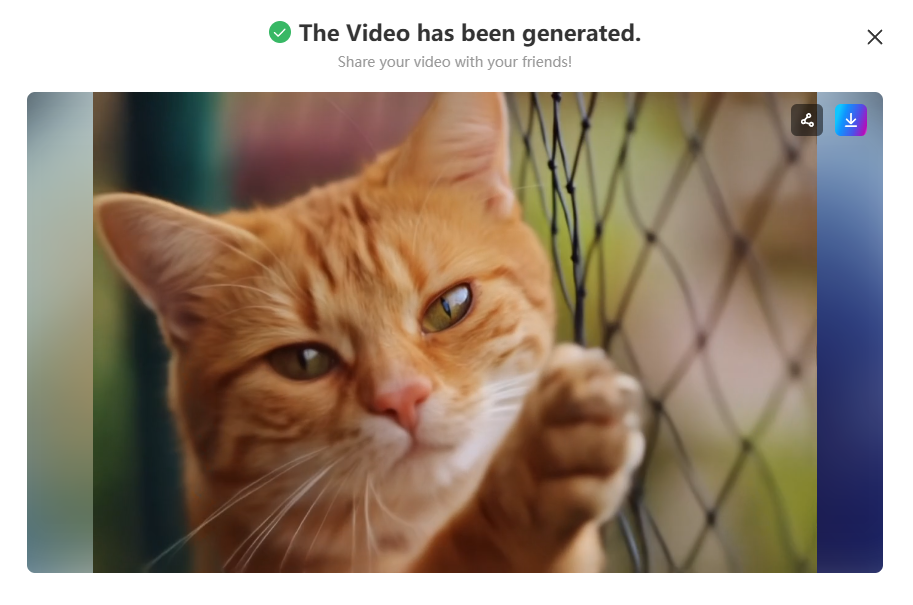
- Pobierz i udostępnij
Teraz możesz pobrać nowy animowany film Zoom-in Earth i udostępnić go online znajomym, rodzinie lub obserwatorom.
Tips for Stunning Earth Zoom Effects
Mango AI wykorzystuje zaawansowaną technologię sztucznej inteligencji, aby tworzenie filmów z Ziemi z powiększeniemZawsze jednak możesz zrobić coś, aby pomóc sztucznej inteligencji uzyskać jak najlepsze rezultaty. Chcesz wiedzieć, jakie? Poniżej znajdziesz wskazówki, jak zapewnić, że sztuczna inteligencja zapewni Ci olśniewające efekty przybliżenia Ziemi w Twoich filmach.
2. Prześlij zdjęcie wysokiej jakości
Sztuczna inteligencja działa najlepiej, gdy ma do dyspozycji wysokiej jakości zdjęcie. Dlatego tak ważne jest przesłanie wyraźnego zdjęcia o wysokiej rozdzielczości, aby sztuczna inteligencja mogła stworzyć animację Ziemi z powiększeniem w najlepszej jakości. Wyrazistość i ostrość zdjęcia ułatwią sztucznej inteligencji skanowanie obiektu i jego otoczenia.
2. Wybierz opcję muzyki w tle
Mango AI pozwala wybrać automatyczną muzykę w tle do filmu Zoom-in-the-Earth. Ponieważ sztuczna inteligencja generuje i odtwarza muzykę automatycznie, nie musisz jej tworzyć samodzielnie. To kolejny sposób na podniesienie wartości rozrywkowej Twojego filmu.
3. Używaj zdjęć plenerowych
Najlepszy efekt Ziemi w zbliżeniu uzyskuje się, gdy obiekt znajduje się na zewnątrz, a nie wewnątrz. Spróbuj użyć zdjęcia, na którym osoba, miejsce, zwierzę lub obiekt znajduje się na zewnątrz. Wtedy, po zbliżeniu efektu Ziemi, będzie on wyglądał bardziej naturalnie, bez przechodzenia kamery przez ściany.
4. Weź pod uwagę elementy wizualne tła
Znajdź najlepsze otoczenie, aby sfotografować siebie lub obiekt. Animacja będzie wyglądać lepiej, gdy kamera w końcu znajdzie się na obiekcie na ziemi i zobaczy otaczającą go piękną scenerię. Dlatego należy unikać zdjęć z zielonymi ekranami lub jednolitym tłem.
Conclusion
Wiesz już, jak stworzyć film z Ziemi z powiększeniem za pomocą Mango AI. Możesz wygenerować dowolną liczbę animacji z powiększeniem Ziemi, aby przyciągnąć więcej ruchu i obserwujących do swoich kanałów w mediach społecznościowych lub na stronę internetową. Filmy z powiększeniem Ziemi zazwyczaj przyciągają ludzi, ponieważ pobudzają wyobraźnię i przyciągają wzrok do widoku przejścia z orbity Ziemi na orbitę okołoziemską.
Twórz kinowe filmy Earth Zoom In z Mango AI