
How to make realistic AI avatar dialogue videos in just minutes. All you need is a clear photo, a script, and an AI tool like Mango AI. With it, anyone can create lifelike AI videos. Just follow simple tips: use good lighting, keep your movements subtle, and let the AI handle the rest. People use these AI videos for marketing, education, and even customer service. You’ll love how easy it is to bring your avatar dialogue ideas to life.
Best AI Avatar Dialogue Video Generator – Mango AI
If you want to make a realistic AI avatar dialogue video, Mango AI stands out as a top choice. It offers a user-friendly AI avatar video generator that lets you turn a simple photo into a spoken dialogue video in just minutes. You get lifelike avatars, precise lip syncing, and a wide range of AI voices. Uploading your photo is easy, and you can start creating your conversational video right away.
Take a look at the AI Avatar Dialog Video Generator’s important features:
| Criteria | Description |
|---|---|
| Visual Fidelity | Clear, realistic video output that looks professional. |
| Audio and Lip-Sync Synchronization | Voices match mouth movements for a natural feel. |
| Scene Continuity | Smooth transitions between frames for a seamless video. |
| Prompt Adherence | The video matches your script or idea closely. |
| Multilingual AI Voices | Select from multiple languages to give your avatars a native voice. |
Tip: Always get permission before using someone’s photo or voice in your talking avatar video. Label your AI-generated content clearly to keep things transparent.
How to Make Avatar Dialogue Videos
Ready to create lifelike avatars that talk and interact in your next AI video? Mango AI makes avatar dialogue creation simple, fast, and fun. Let’s walk through each step so you can produce realistic, engaging content in minutes.
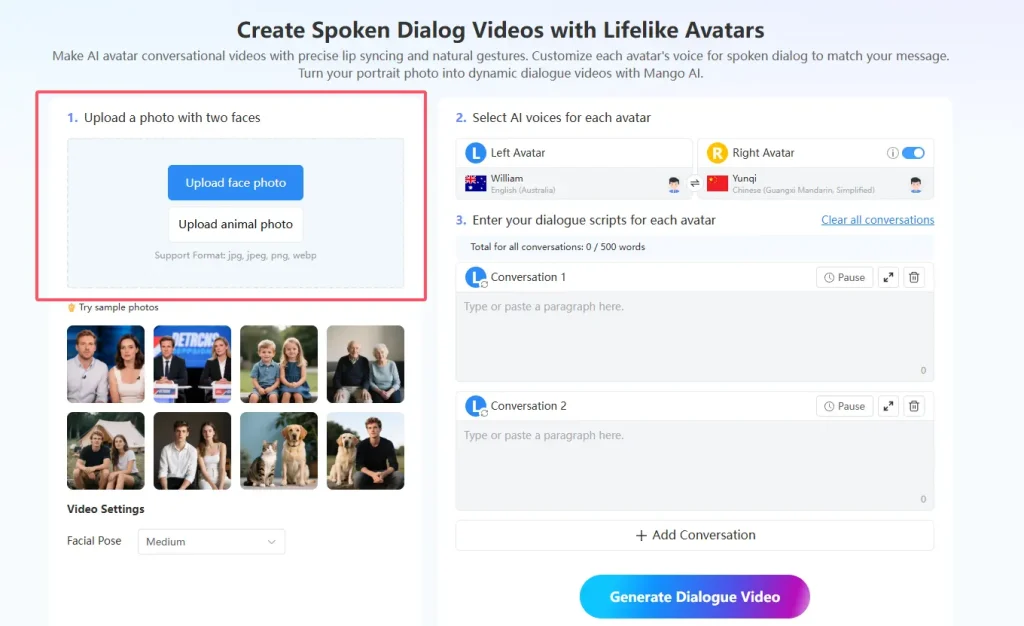
1. Upload a Photo with Two Faces
Start your AI avatar dialogue journey by uploading a clear photo. Mango AI works best when you use a front-facing image with good lighting. If you want two avatars to talk, make sure both faces are visible and well-lit. Avoid blurry or dark photos, since high-quality inputs lead to better video generation and animation.
Tip: Use a jpg, jpeg, png, or webp file. The sharper the image, the more eye-catching your avatars will be.
Common mistakes include using low-resolution photos or images with distracting backgrounds. You can avoid these by choosing a simple, clean photo. This helps Mango AI deliver natural lip-sync and gestures, making your avatar dialogue look professional.
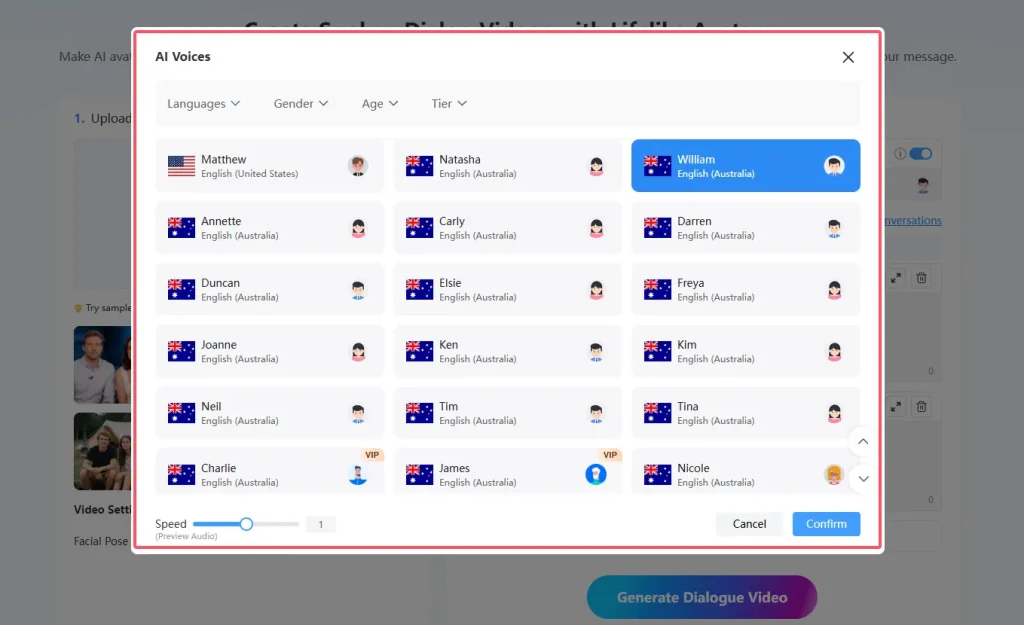
2. Select AI Voices for Each Avatar
Once your photo is uploaded, it’s time to pick voices for your avatars. Mango AI offers over 120 AI voices, so you can match each avatar’s personality and style. With multilingual support, you can also choose voices in different languages to fit your content needs. Try different options until you find the perfect fit.
Browse the voice library and listen to samples.
Match the voice to the emotion or message you want to convey.
Mix and match voices for expressive storytelling.
A user-friendly interface lets you preview voices before you finalize your choices. This step is key to creating realistic avatar dialogue that feels authentic.
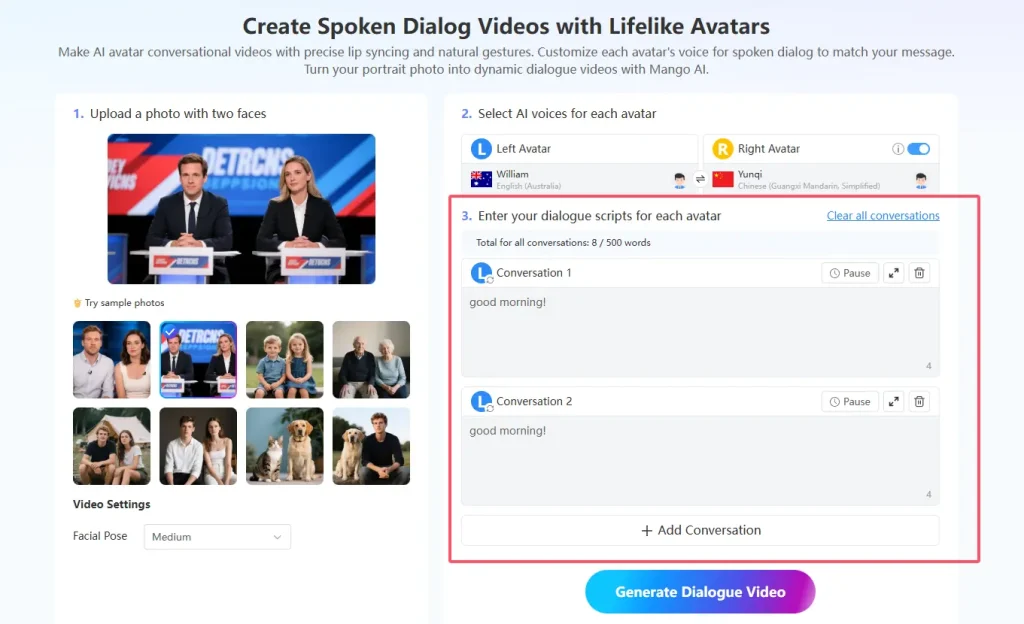
3. Enter Dialogue Scripts for Each Avatar
Now, write the script for your avatar dialogue. Keep it conversational and natural. Mango AI synchronizes mouth movements with spoken words, so your avatars will look and sound like real people.
Here are some tips for writing natural AI dialogue scripts:
Write as if you’re speaking to someone.
Use short sentences and contractions.
Avoid jargon unless it’s needed.
Make transitions smooth and include pauses.
Read your script aloud to check the flow.
Focus on the emotions you want your avatars to express.
State important ideas clearly and repeat them if needed.
Plan your script to fit the video duration.
If you want your avatar dialogue to stand out, use storytelling techniques. This keeps your audience engaged and makes your content memorable.
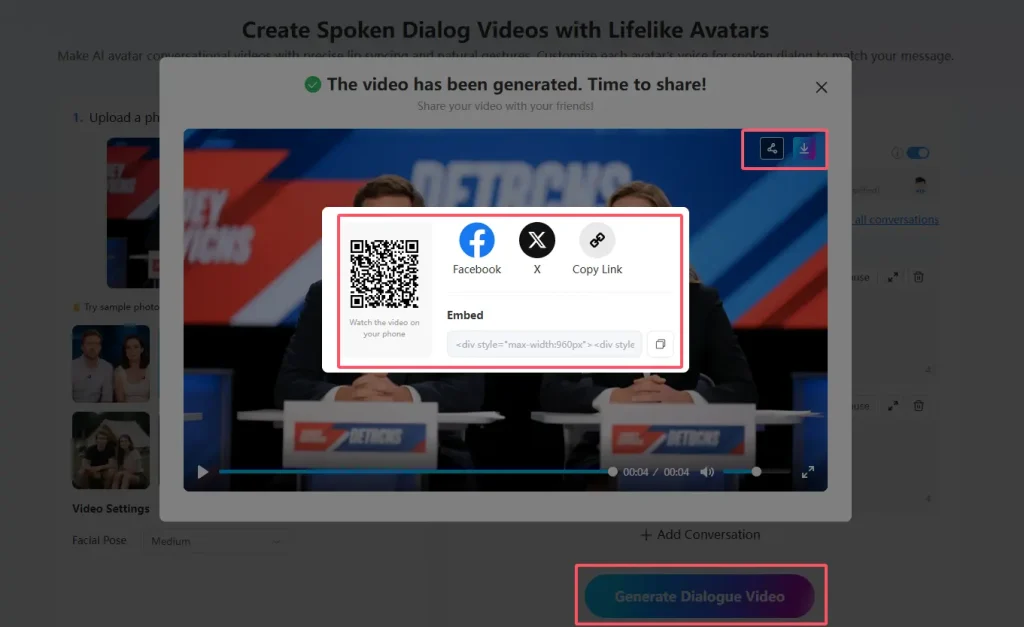
4. Generate and Download Video
You’re almost done! After entering your script, hit the generate button. Mango AI will process your photo and script, then create a realistic AI avatar dialogue video with natural lip-sync and gestures. You can preview the video before downloading to check for any tweaks.
Review the animation and make sure the avatars look and sound right.
Share your finished video in your preferred way.
Note: Don’t rush to publish. Take a moment to review your content for errors or awkward moments. A multi-step review process helps maintain quality.
By following these steps, you’ll master AI avatar dialogue creation and produce videos that captivate your audience. Whether you’re making content for marketing, education, or personal projects, Mango AI helps you create lifelike avatars and expressive storytelling with ease.
Key Takeaways
Creating realistic AI avatar videos is quick and easy with tools like Mango AI. Just upload a clear photo and a short script to get started.
Choose the right voices for your avatars to match their personalities. This enhances the authenticity of your dialogue and keeps viewers engaged.
Use high-quality images and good lighting for better video results. Clear visuals lead to more lifelike avatars and smoother animations.
- Input well-structured dialogues for your avatars. A clear script ensures natural conversations and makes your video more engaging.
Creative Uses for AI Avatar Dialogue Videos
You can use AI avatar dialogue videos in so many ways! In education, avatars simulate teaching sessions, personalize learning, and make complex topics easier to understand. Marketers love AI avatars for scaling video production, personalizing messages, and creating multilingual content. Social media creators use avatars for product demos, tutorials, and customer support, boosting engagement and brand consistency.
Personal projects also benefit from AI avatars. People use them to tell stories, share experiences, or create fun, lifelike content for platforms like TikTok and Instagram. With a user-friendly interface and high-quality output, you can bring any idea to life—no special skills needed.
You can create a realistic AI avatar dialogue video in just minutes. Mango AI makes the process simple and fun. Many users say they enjoy making AI videos quickly and easily. Check out what others say:
| User Name | Testimonial |
|---|---|
| John R. Mitchell | Generating a personalized digital avatar with just a portrait photo and using an AI voice saved me time and resources. |
| Angela D. Carter | Making AI-generated videos is easier than I expected. With this AI video generator, I can produce attractive AI animations and videos at a budget-friendly cost. |
Most beginners face a few challenges:
Flexible Switching Between Dialogues
Voiceover quality that may sound robotic
Platform issues such as browser compatibility
With user-friendly tools, automation, and real-time editing, you can achieve professional results. Try making your own AI video today and see how easy it is to bring your content to life!
FAQ
1. How fast can you create studio-quality avatar videos with Mango AI?
You can finish your avatar video creation in just minutes. Mango AI speeds up the process, so you get studio-quality avatar videos without waiting.
2. Can you use any photo for AI avatar creation?
You should pick a clear, front-facing photo with good lighting. This helps the AI avatar dialogue video generator produce lifelike avatar creation and smooth video content.
3. What makes Mango AI different from other AI avatar video tools?
Mango AI gives you more control over avatar creation. You can customize voices, dialogue, and use advanced AI technology for high-quality video content every time, with multilingual support to reach a global audience.
Create Spoken Dialog Videos with Mango AI