
The latest innovative AI tools can make pictures sing. Content creators and social media influencers love to create singing picture videos to bring entertainment and laughter to their audiences. The best part is that getting started doesn’t require much skill or experience. In this article, we will guide you through the simple process of making a singing picture with Mango AI. Let’s get started now!
Make a Picture Sing a Song in 4 Steps
It only takes a few minutes to make a picture sing a song using Mango AI’s Singing Photos tool. Here are the 4 steps of how you can use this tool to turn any portrait photo into a singing picture video:
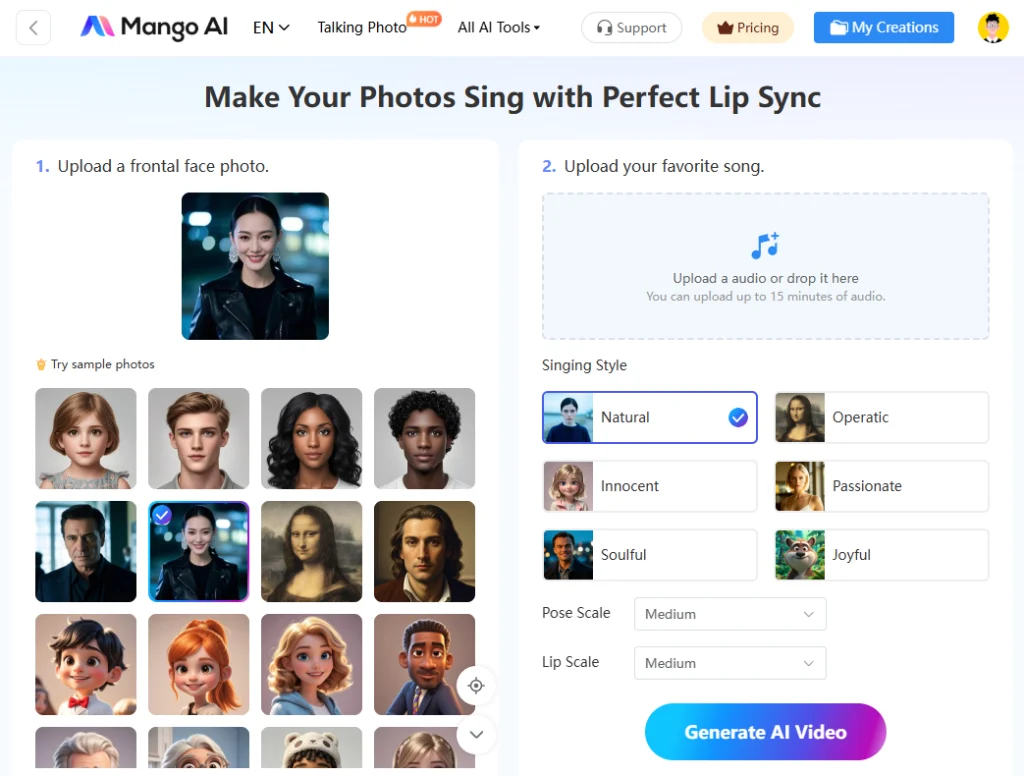
1. Upload a Front-Facing Photo
The first step is to upload a front-facing photograph of a person, cartoon character, or oil painting. It doesn’t have to be commercial-quality, but a simple selfie photo on your smartphone. It is important to ensure it displays a full-frontal view of your face. Mango AI supports
2. Upload Your Song
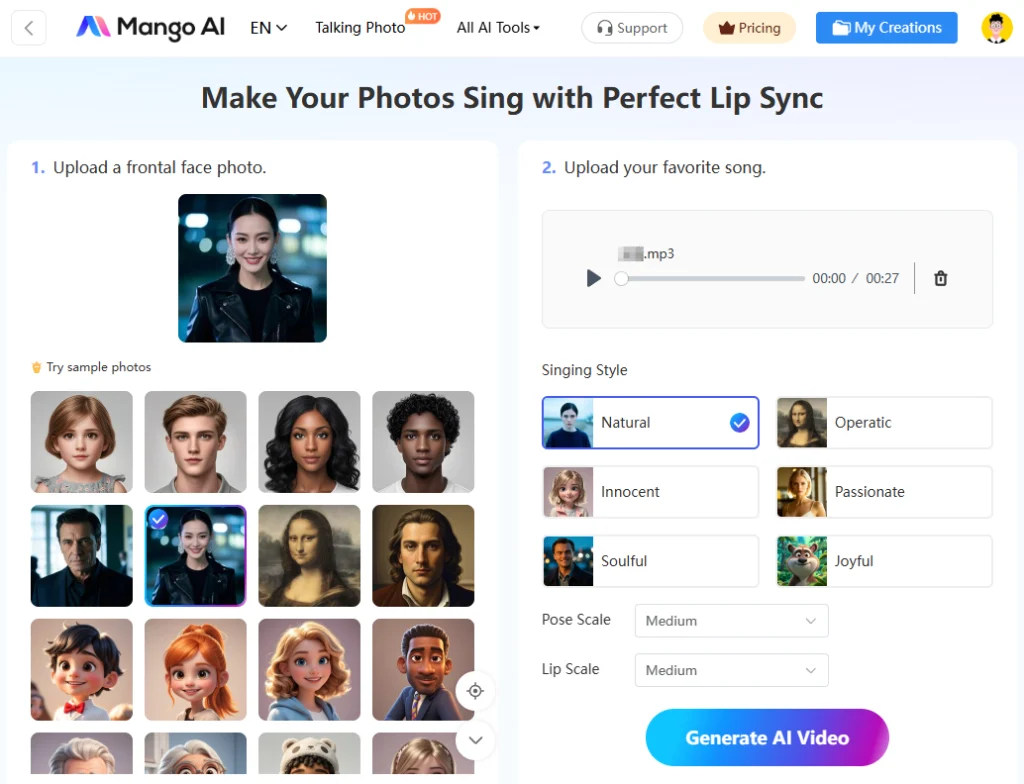
Upload your favorite song in MP3, WAV, M4A, FLAC, or Opus format. This will be the song that your picture will sing after the AI creates the video.
3. Adjust Advanced Settings
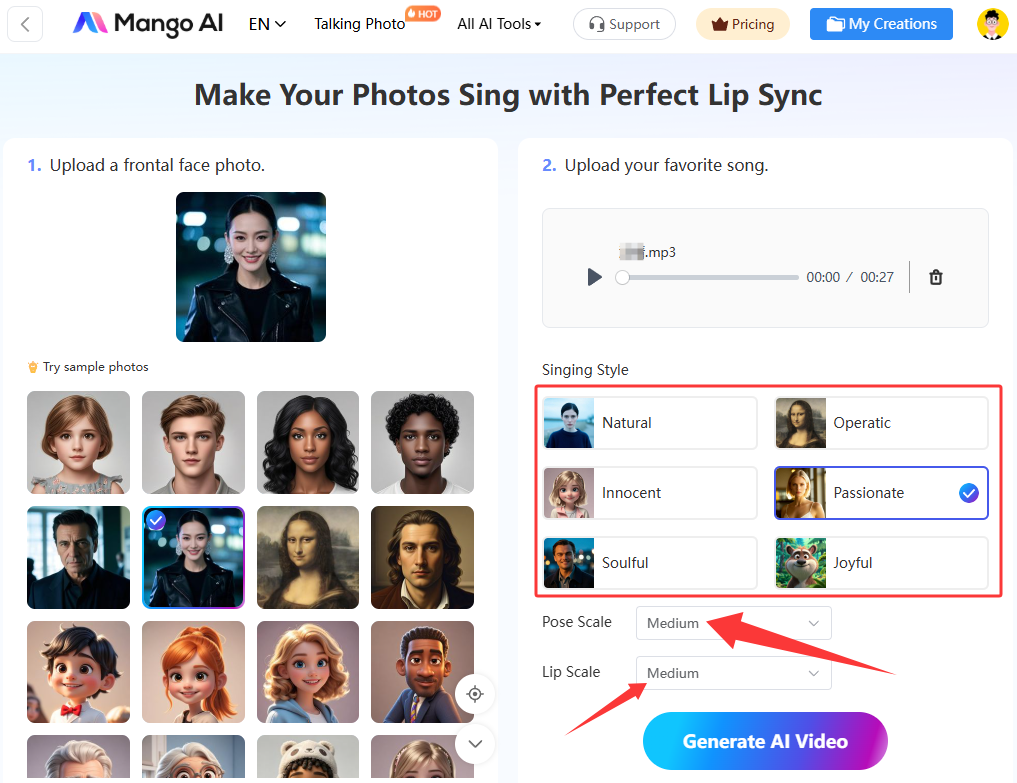
Mango AI provides adjustable advanced settings to let you customize and enhance the video, such as the singing style, pose scale, and lip scale. It covers 6 singing styles, including Natural, Operatic, Innocent, Passionate, Soulful, and Joyful, enabling you to enhance the emotional impact according to specific needs. Make the necessary selections and adjustments to match your particular requirements for the singing picture video.
4. Generate a Singing Picture
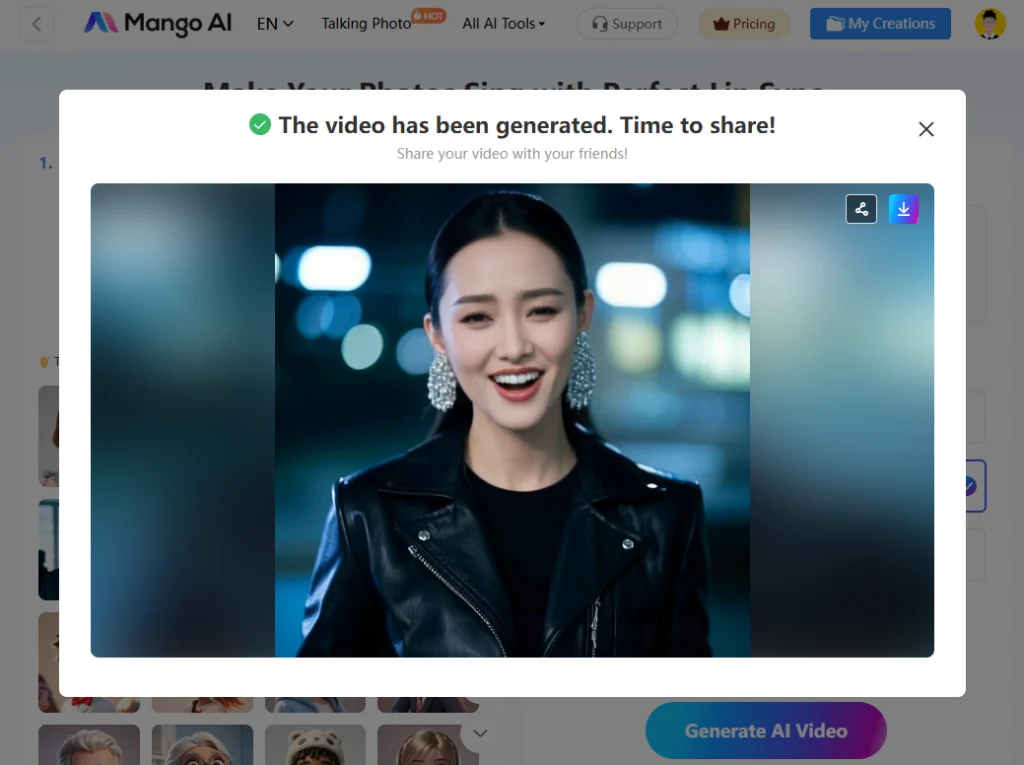
Click the “Generate AI Video” button to make a picture sing a song you like. The AI Singing Photos tool will take a short time to generate your singing face video. When it is finished, download it to your computer or share it with others by simply sending the link. You can also post the video on social media platforms like Facebook, Instagram, and TikTok.
Mango AI: The Best Tool to Make a Picture Sing
There are dozens of AI tools for making a picture sing online. However, the one that stands out the most is Mango AI. People love Mango AI more than any other AI tool because it is easy for anyone to use and produces high-quality results. Below are the key features that make Mango AI the best tool for beginners and experts alike:
Key Features:
1. Intuitive Interface:
Mango AI features a user-friendly interface that outlines all the steps in an easy-to-understand language. The interface clearly shows where to upload your frontal face photo and favorite song. The options to select the singing style, pose scale, and lip scale are also clearly labeled.
2. Various Samples:
It is okay if you don’t have any photos to upload. Mango AI has dozens of free sample photos to select for your singing portrait creation. The images include full frontal faces of men, women, and children, facilitating you to create personalized videos in one go.
3. Different Singing Styles:
Mango AI enables you to select a specific singing style for the AI-generated video, such as Natural, Operatic, Innocent, Passionate, Soulful, or Joyful. Each selection changes the tone and tempo of the song to give it a unique effect when you listen to it.
4. Precise Facial Expressions:
Selecting the pose scale and lip scale options will let you change the size of the face and mouth movements.
Pose scale refers to the head and facial movements of the character in the singing picture. The options for the pose scale include None, Small, and Medium. The higher level you choose, the more head and mouth movements you will see from the character.
Lip scale refers to the lip and mouth movements of the character. The three options presented to you are Small, Medium, and Large. The higher-level options will give you more exaggerated lip and mouth movements.
5. Perfect Lip Sync:
Mango AI adopts cutting-edge, AI-powered lip synchronization technology to analyze the shape and size of the character’s lips to detect their exact dimensions. Then, it will animate the lips to create movements that align perfectly with the spoken words of the song.
6. Easy Sharing:
When you finish generating your singing picture with Mango AI, simply download the video file to your computer or mobile device or copy and paste the shareable link. It will be a high-resolution video to share on your social media channels.
Make Your Pictures Come Alive with Mango AI
Mango AI can do more than make a picture sing. Find out about these innovative tools that bring your pictures to life:
1. Talking Photo
Talking Photo makes a picture talk rather than sing. It follows a similar concept to the Singing Photo tool that makes a picture sing. You just need to upload your photo and audio and select from facial pose options. Mango AI also allows you to generate speech from input text and record your own voice, giving you multiple ways to make a photo talk whatever you want.
2. Live Portrait AI
Live Portrait AI takes the facial expressions and head movements from a video and applies them to a still frontal face portrait image. It animates a portrait within seconds using the video as a basis for the animation.
3. Animate Photos
Animate Photos tool brings pictures to life by focusing on the movements. It transforms any static image into an exciting and engaging video with realistic facial expressions and lip movements. You are allowed to use pictures of people, animals, or cartoons with this tool.
4. Face Dance
Face Dance tool animates frontal face photos to give them realistic facial expressions. This tool generates a face dance video from a selfie or portrait. There are several face dance animation templates to choose from as the basis for your animated face dance video.
To Wrap Up
When you make a picture sing for your audience, they will be attracted and immersed. The singing picture will capture their attention and make them feel interested. By distributing a singing picture, personal and commercial content creators will significantly increase their followers and leads. Mango AI is the best AI-driven online tool to make a picture sing. It has an easy-to-use interface and all the powerful features to convert a frontal face photo to a singing picture with perfect lip synchronization. Give it a try today!
Create a Stunning Singing Picture with Mango AI