
AI technology lets you do amazing things to photographs. Not only can you use it to enhance a photo’s visual quality, but you can also use it to edit and manipulate the content in the image. Everyone, from individuals to businesses, uses online AI tools to modify pictures, making them funnier, more attractive, or more noticeable. The latest form of AI-based manipulation lets you swap multiple faces in a photo.
What Does “Multiple Face Swap” Mean?
Multiple face swap is a term that describes an AI tool that can replace multiple faces in a single group photo with the faces featured in other target photos. The advanced AI technology can detect the outline of every face in the same image and then digitally swap them out with other faces from different photos.
Some people use a multiple face swap tool to replace their faces with those of celebrities, friends, family, or historical figures. The AI makes the face swap look realistic, allowing it to be indistinguishable from the original.
Mango AI: Best AI Multiple Face Swap Photo Tool
Mango AI is a free AI-powered multiple face swap photo tool online. Anyone can use this tool to swap multiple faces in one group photo with those in the uploaded target face photos. No special technical skills or experience are needed to use Mango AI. All it takes is a few clicks and uploads, and the AI technology will take care of the rest. The platform also supports multiple face swap in video, allowing you to create realistic AI video face swaps online for free. Whether for fun, creativity, or content production, Mango AI delivers seamless face swapping results.
Key features of Mango AI:
- Swap Multiple Faces Simultaneously – Swap two or more faces in a single group photo simultaneously.
- Fast and Simple – Quickly analyze and swap out the faces.
- User-Friendly Interface – Easily find all the controls and options needed to swap multiple faces.
- Realism – Make everything look realistic when replacing multiple faces in your group photo.
- No Cost – Completely free to use online.
Mango AI is the best multiple face swap tool due to its speed, ease of use, and high-quality results. It is ideal for any individual or business wishing to attract attention through humor, entertainment, or curiosity.
Step-by-Step Guide: How to Swap Multiple Faces for Free
Do you want to learn how easy it is to use Mango AI to swap multiple faces online for free? Below are the simple steps explained:
- Access the Mango AI Page
Visit the Mango AI Free Multiple Face Swap Online page.
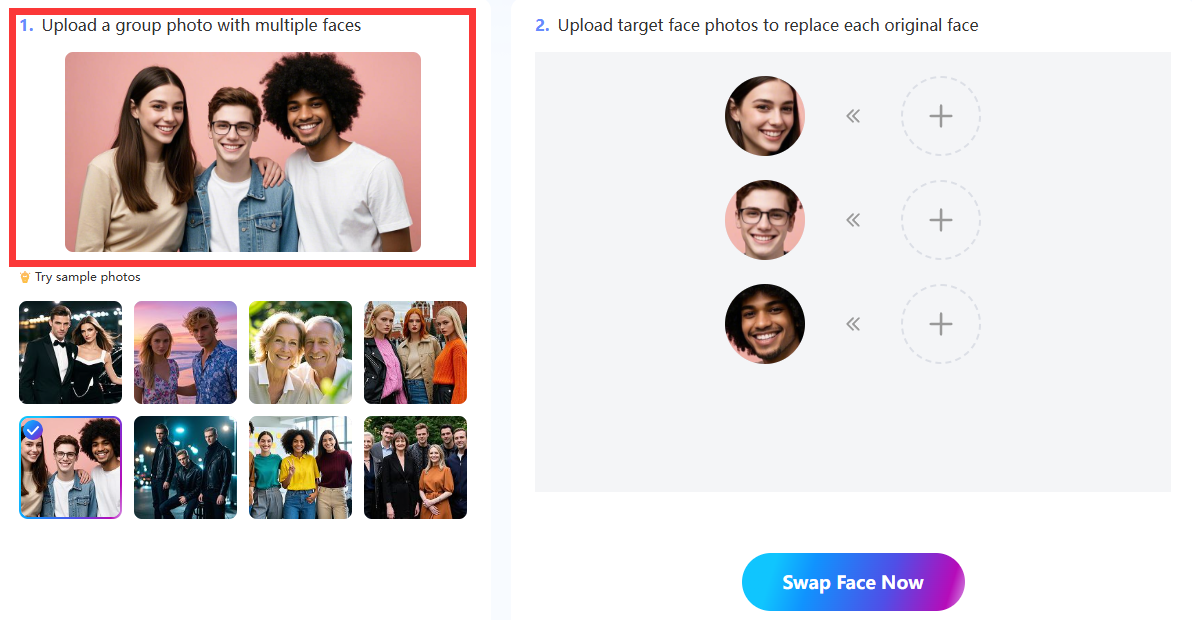
- Upload Your Group Photo
The next step is to upload any group photo featuring at least two faces or more. Make sure it is a high-resolution photo that clearly shows a full-frontal view of everyone’s face. The better the image, the more precise the swapping of multiple faces. Sample photos are available if you do not have any group photos of your own.
- Upload Target Face Photos
Now you must upload a separate target face photo for each face that you would like to replace in the original group photo. For example, if your group photo has three faces in it, you must upload three target face photos, one for each face swap.
Once again, your target face photos should contain full frontal views of the people’s faces to ensure the best results possible.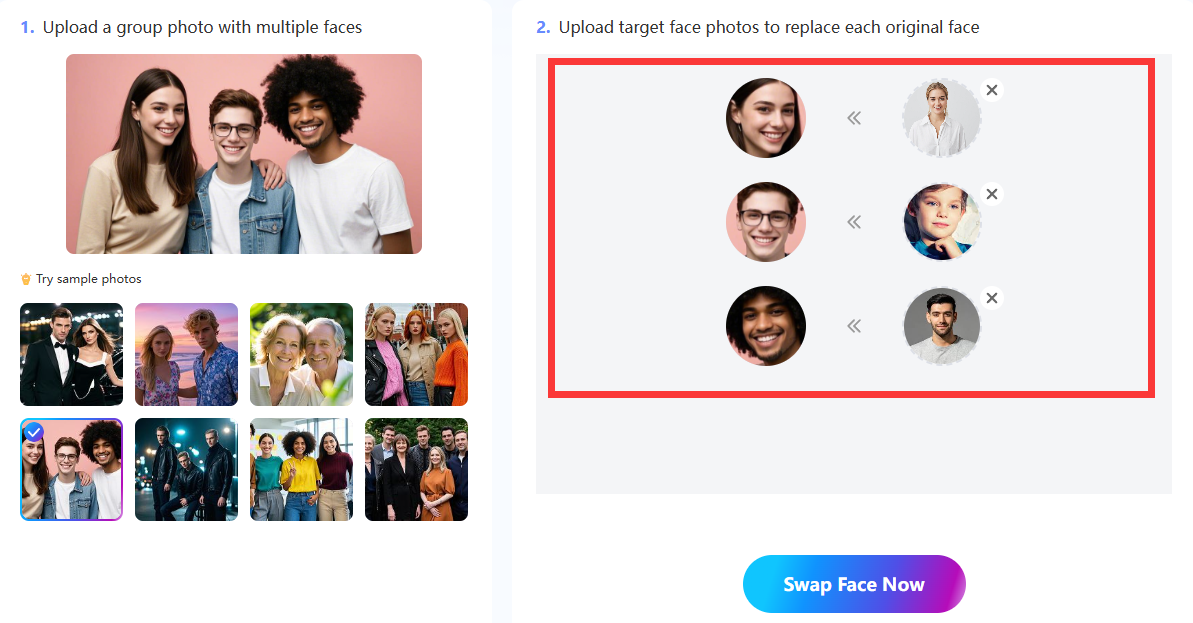
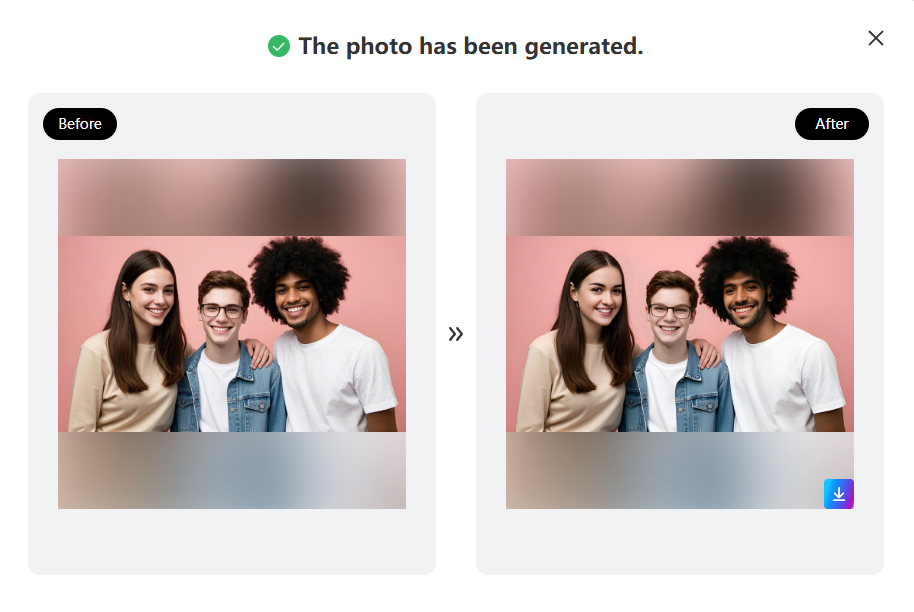
- Swap Multiple Faces and Download
Click the “Swap Face Now” button to let the AI get to work. It won’t take more than a few minutes for the AI to detect all the faces in the group photo and then swap each one with its corresponding target face. Download the final photo with the new multiple faces in it. Share the picture on your website, social media profiles, or wherever else you would like to promote it.
Tips for Better Face Swap Results
The AI will do a lot of the work for you, but there are always things you can do to make its job even easier. Below are some helpful tips to make the face swap results even better.
1. Use High-Resolution Photos
Try to use the best-quality group photos and target photos possible. These are high-resolution photos (1080p or 4K) with clear visibility of everyone’s faces. Please avoid using any pixelated or blurry images.
2. Match the Head Positions
The head positions of the people in the group photo and target photos should match as much as possible. Since the head positions influence the angles of the faces, it will be easier for the AI to swap faces if they have similar angles.
3. Match the Face Expressions
The AI can more accurately swap multiple faces if the group photo and target photos have similar facial expressions. For instance, if everyone in the group photo is smiling, try to use target photos where people are smiling as well.
4. Match the Lighting
It helps if all the photos have similar brightness and tones to make the final results look realistic. Otherwise, if the group photo and target photos have a mixture of dark and bright tones, the results won’t look good.
Creative Experiments with Multiple Faces
There are numerous creative ways to experiment with swapping multiple faces in your photos. Here are some fun ideas below:
- Family and friend face swaps
- Celebrity face swaps (e.g., actors, comedians, musicians)
- Historical face swaps
- Event promotional face swaps
There is no limit to the potential of Mango AI’s multiple face swapping tool. Just play around with different face swapping ideas to see which ones produce the outcomes you are looking for.
Conclusion
It has never been easier to swap multiple faces online. A fast and easy-to-use tool like Mango AI is all you need to replace multiple faces in a single group photo with the faces featured in other target photos. You can have it done within a few clicks.
Instantly Swap Multiple Faces in Any Photo Online for Free with Mango AI