
Have you ever looked at a still photo and wished you could make pictures move? Well, now you can bring those images to life without any hassle. Thanks to smart AI tools, it’s possible to make pictures move in ways that feel fun and creative. Whether you’re adding motion to a family snapshot or turning a pet photo into something lively, the process is straightforward. And the best part? You can do it all online for free with the right platform. That’s where Mango AI comes in. This tool from Mango AI helps anyone, from beginners to pros, add animation to photos quickly. It offers a range of options to create moving pictures that grab attention. Let’s explore how to get started and see what makes this tool stand out.
Mango AI: Your Go-To Tool to Make Pictures Move
Technology keeps getting better, and tools like Mango AI are leading the way in video creation. It’s designed to make things simple, so you can focus on your ideas. With Mango AI’s Talking Photo tool, it’s a breeze to animate still images. It works well for marketing, fun projects, or sharing stories.
Plus, it handles different file types like JPG, JPEG, PNG, and WebP. This flexibility means you can make still images move without worries. Many users love how it turns basic photos into engaging clips. If you don’t have any photos on hand, Mango AI provides sample photos so you can try out its features.
How to Make Pictures Move with Mango AI
One of the top ways to make pictures move is through the Talking Photo tool. It lets you animate a portrait into a talking avatar. To try it out, click this link: https://mangoanimate.com/ai/talking-photo. Here’s how to do it in easy steps.
1. Choose a Photo
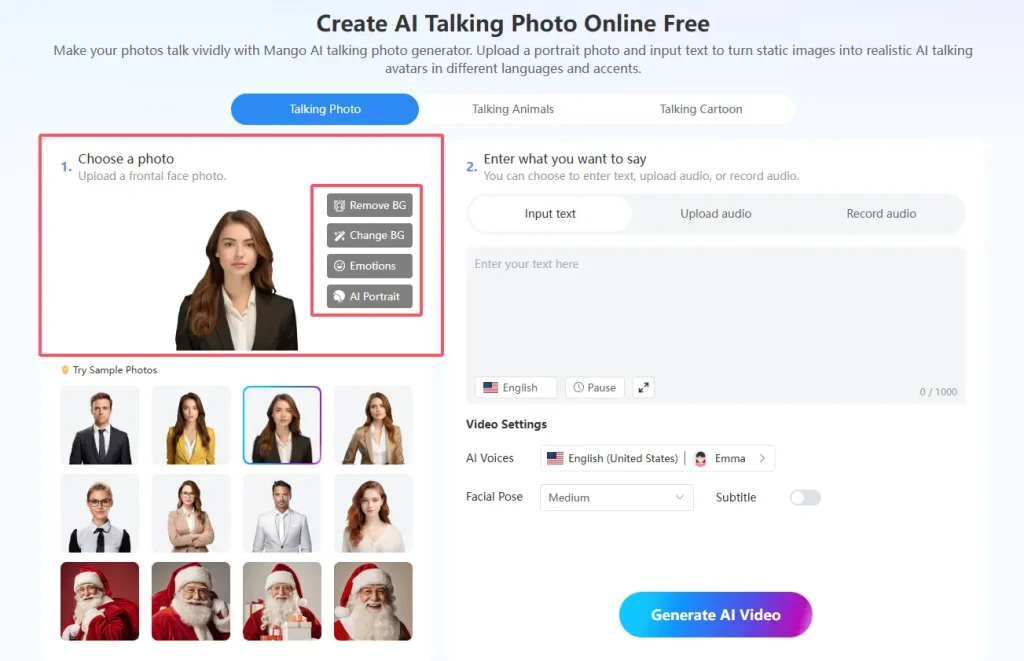
Start by uploading a frontal face photo. You can click “Upload a photo” or drag and drop it right there. The tool supports JPG, JPEG, PNG, and WebP formats. This gives you options for different images.
If you want to tweak the photo, use the remove background feature. It cleans up the image nicely. Or try the change background option to set a new scene. You can also add emotions to make the face expressive.
Another handy choice is the AI portrait enhancement. It polishes the image by putting your face on a replaced background with templated images for better results.
Don’t have a photo ready? Pick from the sample photos provided. They help you test things out fast.
2. Enter What You Want to Say
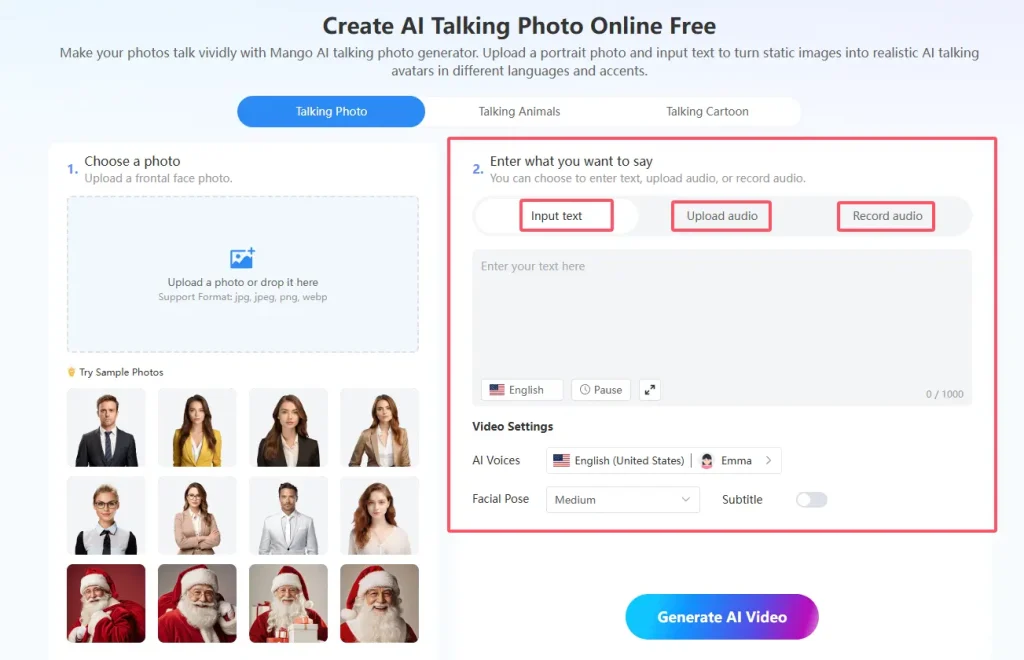
Next, decide what the photo should say. Type in text and select an AI voice for the AI avatar to speak. There’s a pause button during recording, which makes it user-friendly. Or upload an audio file if you have one. You can even record audio directly in the tool.
After that, customize further. Adjust the facial pose to fit the message. And if you prefer, remove the watermark for a clean look. These options ensure the result feels real and polished.
3. Generate Your Talking Picture
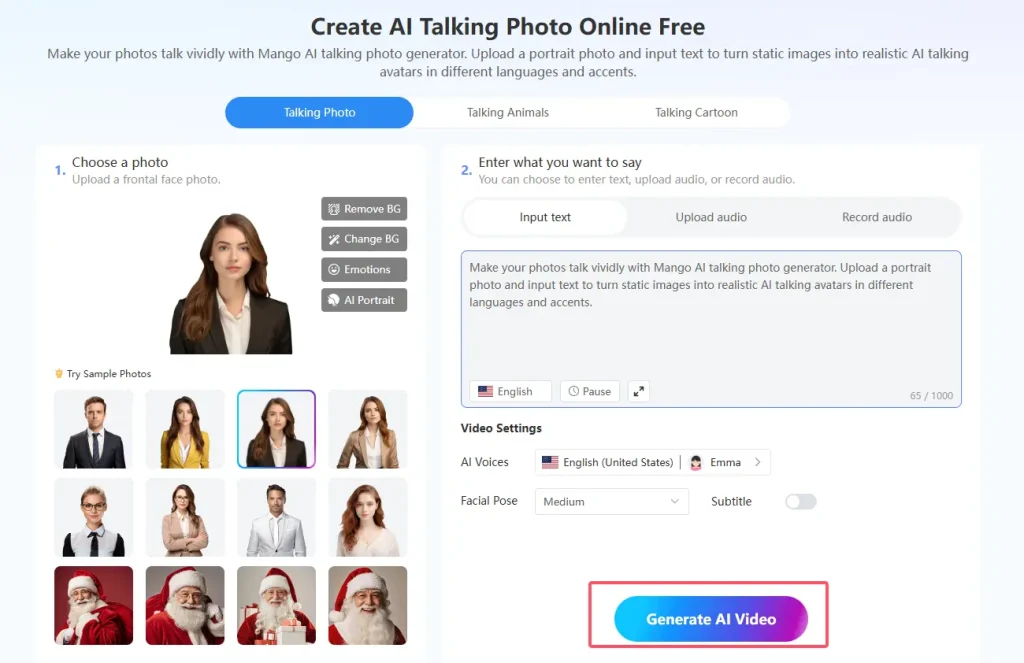
Once everything is set, hit the generate button. The AI processes it quickly. In moments, you’ll have a video where the photo talks and moves. Download it in MP4 format to share. This step turns your static image into something dynamic. It’s great for presentations or social posts. See how easy it is to turn picture into moving video? With these steps, anyone can get pro-level results.
Other Tools to Make Pictures Move
Mango AI has more than just one option. Here are other tools that help you create moving pictures. Each one adds a unique twist.
1. Live Portrait AI
Want natural motion in your portraits? Try Live Portrait AI. It transforms still pictures into portrait animations online. Upload a driving video up to 15 seconds and 30MB for free. Then add your photo. The tool will apply the motion from the video to the picture, generating a video with realistic facial expressions and head movements. Sample videos and photos make it quick to start. This creates lifelike animations that feel alive.
2. Talking Animals
Upload a photo of your dog, cat, or any other animal, enter your text, and choose an AI voice. The pet AI talking animal tool brings your pets to life, making them speak vividly. You can also upload audio files or record directly for fully personalized messages. Fine-tune facial poses and lip movements for realistic expressions. This innovative tool excels at creating humorous talking animals, making it popular for social media content and entertaining videos.
3. Talking Cartoon
Simply upload a cartoon character image, enter text, or upload audio files and record your voice directly—the tool will generate talking cartoon videos instantly. If you don’t have images on hand, Mango AI provides sample characters to choose from, including male, female, and Santa types. This tool specializes in character animation, making cartoon figures speak with natural lip synchronization. Perfect for educational content, storytelling, presentations, or creative projects that bring illustrated characters to life.
4. Animate Photos
For dynamic motion effects, explore the AI photo animator. Upload your image or choose from samples, then select example videos to drive the animation. The AI applies realistic motion patterns to faces and characters, creating videos with natural movement and expressions. This tool shines in adding subtle motion to portraits for artistic effect. The focus is on creating smooth, believable animations that maintain photo authenticity.
5. Singing Photos
Do you want to make a photo sing? Upload a frontal face photo and your favorite song audio—you can use tracks up to 15 minutes long. Choose from singing styles such as natural, operatic, innocent, passionate, soulful, or joyful. Fine-tune pose and lip scales for optimal lip-sync accuracy. The result is a singing portrait with perfectly synchronized vocals and movements. This tool excels at creating entertaining content for celebrations, music tributes, or fun social media posts that combine personal photos with your favorite songs.
6. Singing Animals
Let pets become musical stars using the singing animal creator. Upload a frontal pet photo and a song audio, and the tool will create realistic singing animals in a short time. Choose from singing styles such as natural, operatic, innocent, passionate, soulful, or joyful. Adjust pose and lip scales for excellent musical performance. This tool creates delightfully funny clips where animals appear to lip sync to songs, ideal for viral content, entertaining social media posts, or amusing pet tributes.
7. Face Dance
Create interesting face dance videos online with the face dance generator. Upload a photo and select from example videos to drive the dance animation. The AI adds natural face dance moves and rhythmic motion to make a picture dance. Use sample photos to experiment quickly. This playful tool specializes in creating energetic, fun content that makes static faces come alive with dance movements. It is ideal for party invitations, celebration posts, or simply adding joy to ordinary photos.
These tools demonstrate Mango AI’s versatility. You can combine them for different projects, starting with a photo and adding talking, singing, or dancing effects to make still images move in creative ways.
Key Features to Look for in a Tool to Make Pictures Move
Picking the right tool matters. Here are some things to consider when you want to turn picture into moving video.
1. Easy Interface
Look for something simple to navigate. Drag-and-drop uploads save time. Clear steps guide you without confusion. This keeps the process smooth for everyone.
2. Quality Results
Good tools deliver smooth animations. They avoid odd distortions. Advanced AI ensures natural looks. Your final video should impress viewers.
3. Versatile Options
Variety adds fun. Different styles like talking or singing fit various needs. More choices mean better storytelling or entertainment.
4. No Extra Marks
Free versions sometimes add watermarks. But options to remove them help. This way, your work looks professional without costs.
5. Quick Speed
Fast processing is key. You don’t want long waits. Efficient tools handle it swiftly, even on basic devices.
6. File Support
Check for common formats like JPG or MP4. Good export options make sharing easy. This avoids format issues.
7. Safe Handling
Privacy counts when uploading photos. Secure policies protect your data. Always review them for peace of mind.
These features make tools like Mango AI reliable. They balance ease and power.
Conclusion
So, if you’re ready to make pictures move, Mango AI is a smart choice. The platform turns ideas into reality with simple steps and fun results. Whether for laughs or work, you can make pictures move and wow others. With its comprehensive suite of tools – from talking photos to singing animals – you have everything needed to bring static images to life. Give these tools a try today and see the magic!
Make Pictures Move Easily and Quickly with Mango AI