
Have you ever wanted to turn a simple video clip into something more dynamic, like adding speech that matches the mouth movements perfectly? This can bring your content to life in surprising ways. Lip sync AI lets you pull that off by automatically aligning the audio and text with the facial movements. In this article, we’ll walk you through using lip sync AI to create lifelike and natural lip sync videos, all without paying anything. It’s easy for anyone to get started, and the results can look impressively professional right from the start.
Why Choose Mango AI for Lip Sync Tasks
Mango AI offers a solid option for those starting out. It’s designed to be user-friendly, so you don’t need advanced skills. The tool focuses on syncing lips to audio or text inputs effectively. One standout feature is its fast processing speed—you can see results within minutes, which keeps your workflow efficient and smooth.
Another benefit is its web-based accessibility. No installations required, which appeals to many users. It handles basic adjustments well, like background changes or mouth positioning. These small tweaks make a big difference in the final video. For instance, if the original clip has an open mouth, you can close it for a cleaner look. Such features help refine your project without extra effort.
Mango AI supports lip-sync generation using your own uploaded videos. This means you work with your own clips rather than preset options, ensuring your content stays personal. Overall, Mango AI it’s a great fit for free users of all skill levels. While premium unlocks more, like watermark removal, the core functions work fine at no cost. This makes it an accessible and efficient option for syncing audio and video online.
How to Use Mango AI’s Lip Sync Video AI
Getting started with lip sync creation is easier than you might think. The process breaks down into clear steps. By following them, you’ll produce synced videos in no time. Remember, this uses lip sync AI online free capabilities, so everything happens in your web browser. First, sign up for free to access the tool. Then prepare your video clip—it should feature a clear face for best results.
1. Upload Your Video Clip
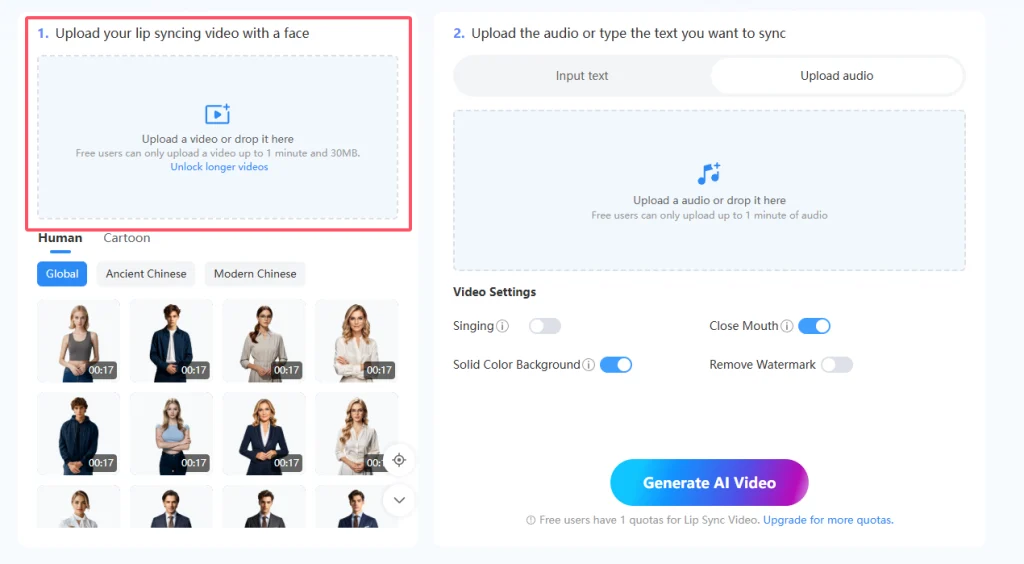
Head over to the Mango AI lip sync page. Upload a video featuring a clear face that you want to synchronize lips with. You can directly drag and drop the video file or select it from your device. For free accounts, keep the video under one minute long and no larger than 30MB. This limit ensures smooth processing. Once uploaded, the AI detects the face automatically. If the upload succeeds, you’ll see a preview. Additionally, high-quality video material helps achieve better synchronization results later on.
2. Add Audio or Text Input
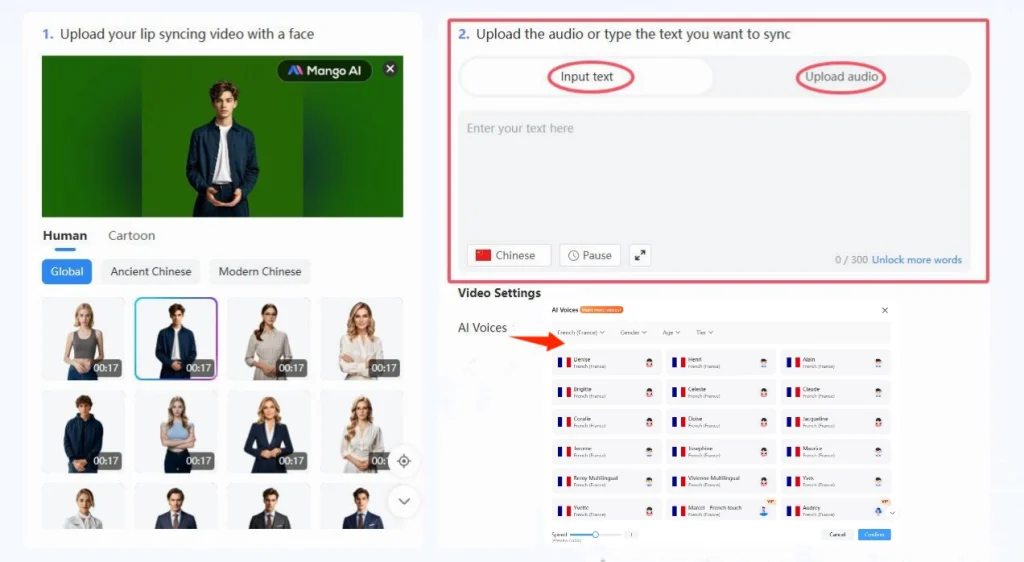
Next, add the content you want to sync. You have two options: either type your script into the text box and select an AI voice, or upload an audio file directly. The tool will then convert your input into a lifelike and natural lip-sync video.
For text input, Mango AI provides a rich library of AI voices in multiple languages. You can filter voices by age, gender, and language to find the perfect match. You are also able to adjust the speed of the audio and add pauses. This flexibility allows you to create highly customized, natural-looking lip-sync videos as needed.
3. Adjust Video Settings
Next, fine-tune the options before generating your video. Enable the close mouth feature if the original video shows an open mouth. This creates a more natural resting position. You can also set a solid color background, which helps keep the focus on the subject and makes the video look cleaner.
For free users, a watermark will appear in the output. Premium removes it, but it’s not a big issue for casual use. These settings enhance the video without complicating things. Take a moment to review them. Small changes like these often improve the overall quality significantly.

4. Generate and Download the Result
Finally, click the Generate button to start the process. The AI works its magic, syncing the lips to the audio or text. It usually takes just seconds or a minute, depending on the length. If you need to step away, find it later in the “My Creations” section of your account. Now you have a lip-synced video created with the lip sync AI online free tool. You can download the video and share it with friends, family, or across your other channels.

Tips for Achieving Better Lip Sync Results
To squeeze more from the lip sync video AI, stick to good habits. Start with clips showing clear, front-facing faces. Angles from the side may not match great. Light is key too—steer clear of shadows hiding the mouth. For text entry, use regular phrasing. Makes the AI sound more true.
For audio uploads, ensure the sound is clean. Background noise can affect accuracy. Test short clips first before longer ones. If using the close mouth option, check how it looks in preview. Sometimes, leaving it off works better for certain expressions.
Play with backdrops. A plain color background helps the clip stand out, especially for professional work. Last, check the result a few times—small adjustments to the settings can make a big difference. Following this advice can help you improve your skills and achieve better results.
Conclusion
Creating lip-sync videos doesn’t have to be difficult. Mango AI’s free lip sync AI allows you to transform your clips into lively, realistic lip-sync videos without any hassle. With its intuitive interface and customizable options, you can produce professional-looking results in minutes. Whether you’re creating content for fun, storytelling, or social media, Mango AI makes it simple to bring your videos to life and share them with your audience. Give lip sync AI a try and see how it can elevate your projects.
Create Awesome Lip Sync Videos with Mango AI